8 Best Slide Scanners to Buy for Home (November 2026)
The best slide scanners for home use include the Kodak Slide N Scan for most home slide collections, the ClearClick Virtuoso 2.0 (best warranty coverage), and the Kodak Scanza for mixed film archives.
On this page (9 sections)
- Which slide scanner suits your shelf and your slides
- How the slide scanners compare side by side
- How we compared these slide scanners
- What is the best slide scanner to buy if your slides are mostly 35mm?
- Do you need Super 8 or 8mm support?
- Which features make slide scanning quicker?
- Can a slide scanner replace a flatbed for photos and paper?
- Should you buy a slide scanner or send the slides to a service?
- Verdict
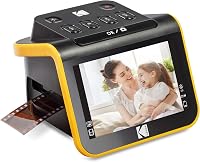
The best slide scanner to buy for most homes is the Kodak Slide N Scan, with a 5-inch preview screen, 22MP output and easy-load trays for 135, 110 and 126 film. It handles a shoebox of slides without a laptop beside you.
If you want extra cover, the ClearClick Virtuoso 2.0 carries a 2-year warranty you can extend to 3. For Super 8 reels, pick the Kodak Scanza or Magnasonic FS71.
Most people asking what is the best slide scanner to buy are moving a family archive to digital files. The decision comes down to two things: which formats are in the box, and how much help you want watching the frames as they go by.
Our picks at a glance
-
1
-
2

-
3

- 4
 Check it
Magnasonic 24MP All-in-One Film Scanner
Best for Super 8 and larger files - 5
 Check it
HP Film and Slide Scanner FS500
Best touchscreen controls - 6
 Check it
HP Film and Slide Scanner with 7-Inch Screen
Best for viewing on a big screen - 7
 Best for photo prints and slides togetherCheck it
- 8
 Best for a large screen and SD card in the boxCheck it
Which slide scanner suits your shelf and your slides
The Kodak Slide N Scan is the best pick overall because it covers the common formats and makes loading quick. Everything below solves a narrower need: a warranty, a bigger screen, a mixed film archive or print scanning.
Slide scanning is a table job. You load a tray, check the preview, press scan and keep going; a model with a good screen and simple inserts saves real time across a few hundred frames.
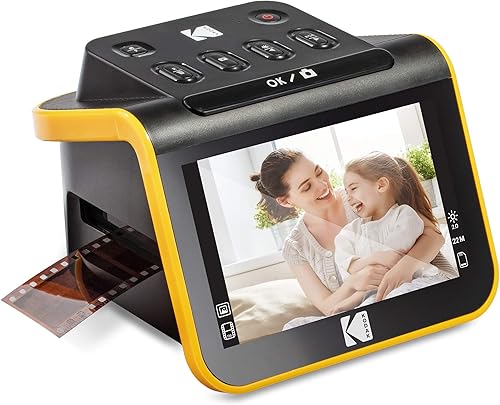
Kodak Slide N Scan: Best for most home slide collections
- 22MP output
- 5-inch LCD with gallery mode
- Easy-load inserts for 135, 110 and 126 film
- 50mm slide holder included
- SD card up to 32GB
A standalone film scanner with a big preview screen and quick-load trays. It handles the common slide and negative sizes without a computer.
Pros
- Large 5-inch screen with gallery mode
- Easy-load inserts for continuous feeding
- One-touch editing for color, brightness and date
- HDMI and USB output
Cons
- SD card not included
- No Super 8 film support
Kodak's Slide N Scan is the easiest starting point for a household with one or two shoeboxes of 35mm slides. The 22MP sensor is a sensible middle ground for viewing on a TV or printing at small sizes.
Its 5-inch LCD shows each frame before you scan, and gallery mode turns the device into a digital picture frame when the work is done. The quick-load insert system lets you feed slides continuously instead of pulling out a tray each time.
Kodak includes the 50mm slide holder and adapters for 135, 110 and 126 film, plus a cleaning brush and USB and HDMI cables.
In daily use, the one-touch scan button and simple menu keep you moving. You choose the film type, adjust brightness if a slide is dark, and assign a date and time so scans sort sensibly later.
Files save to an SD or SDHC card of up to 32GB, which is not included. The 24-bit color depth and CMOS sensor are enough for family viewing on a TV or laptop screen.
The trade-off is range: it stops at 135, 110, 126 and 50mm slides, so Super 8 reels need one of the models further down. It measures 5.27 by 5.35 by 3.74 inches and weighs 16 ounces.
For ordinary slide collections, it is the pick to beat.
ClearClick Virtuoso 2.0: Best warranty coverage
- 22MP output
- 5-inch preview screen
- 35mm, 110 and 126 negatives plus 50mm slides
- Mini HDMI output
- 2-year warranty
ClearClick's second-generation scanner runs without a computer and carries a 2-year warranty. The slide-through holders speed up loading.
Pros
- Scan and save in 1 to 2 seconds
- Automatic or manual color and brightness
- 2-year warranty extendable to 3
- USB-based tech support from a US business
Cons
- Mini HDMI cable not included
- SD card not included
ClearClick's Virtuoso 2.0 is the pick for buyers who want backup if something goes wrong. ClearClick provides a full 2-year warranty that extends to 3 with product registration, and tech support comes from a US small business.
The scanner saves a frame in about 1 to 2 seconds, which matters when a stack of slides fills the tray. A 5-inch screen previews each one, and the slide-through holders accept 35mm, 110 and 126 negatives plus 50mm slides.
Adapters for the smaller film sizes are included.
Color and brightness are set automatically, though the top buttons let you take manual control if a batch looks flat. There's no computer in the loop: scans land on an SD card, and a mini HDMI port handles a TV if you want a bigger view.
Files transfer to a PC or Mac by moving the SD card. The 22MP output is interpolated, and the 24-bit color depth suits everyday photos.
At 11 ounces and 5.3 by 5 by 3.7 inches, it is lighter than the Kodak and easy to move between rooms. Choose it over the Kodak for the warranty and the very quick scan time.
The small gaps are the SD card and mini HDMI cable, which you buy separately.
Kodak Scanza: Best for mixed film archives
- 14MP sensor with 22MP interpolation
- 3.5-inch tilting LCD
- 35mm, 126, 110, Super 8 and 8mm film
- SD card up to 128GB
- USB, HDMI and video cables included
A compact converter that also takes Super 8 and 8mm film as still frames. The tilting screen helps when the scanner sits on a low shelf.
Pros
- Widest film format list here
- Adjustable, tilting 3.5-inch display
- Numbered inserts and trays
- Cables and cleaning brush included
Cons
- Smaller screen than the top picks
- Super 8 converts to still images, not video
The Kodak Scanza earns its place with one of the widest format lists here: 35mm, 126, 110, Super 8 and 8mm film, plus slides. That makes it the scanner for a mixed drawer of negatives and home movies.
Its 14MP sensor interpolates to 22MP, and the 3.5-inch LCD tilts so you can see it from a low shelf. Numbered inserts and trays line up with an on-screen directory, which keeps first-timers from fumbling.
The kit includes USB and HDMI cables, an AC adapter, a video cable and a cleaning brush. A CCD light source sits under the sensor.
Expect a slower pace than the ClearClick, and remember that Super 8 frames become still images, not video. Kodak also says this is a camera-based snapshot scanner rather than a high-end flatbed, so treat it as a way to get the archive moved, not as a fine-art reproduction tool.
The SD slot takes cards up to 128GB. The screen tilts for a reason: you can sit it on a low shelf and still read it.
Pick it if you have film in more than the usual sizes. Skip it if all you own is 35mm slides and you want the largest screen.
Magnasonic 24MP All-in-One Film Scanner: Best for Super 8 and larger files
- 24MP JPEG output
- 5-inch LCD with HDMI
- 35mm, 110, 126 and Super 8 film plus 135, 126 and 110 slides
- SD card up to 128GB
- On-device brightness, RGB and mirror controls
Magnasonic scans common film types at 24MP and shows each frame on a 5-inch screen. HDMI lets you move the slideshow to a TV.
Pros
- Highest pixel count in this group
- 5-second scanning with fast-load trays
- RGB and brightness edits on the device
- 1-year manufacturer warranty
Cons
- Scanning takes longer than the ClearClick
- No touchscreen controls
Magnasonic's FS71 goes a step further on pixels. It saves JPEGs at 24MP, tied for the highest count in this group, and it still reads 35mm, 110, 126 and Super 8 film along with 135, 126 and 110 slides.
The 5-inch screen lets you adjust brightness and RGB color, plus flip and mirror, right on the device. An HDMI port moves scans to a TV for a family slideshow, and the SD slot supports cards up to 128GB.
A CCD sensor does the capturing. The 1-year manufacturer warranty covers it.
Scanning takes about 5 seconds per frame, so a big box will occupy an afternoon. The trade-off against the ClearClick is speed; the trade-off against the touchscreen HP is the lack of touch controls.
It measures 4.44 by 5.43 by 4.91 inches and weighs 13.44 ounces, so it sits happily on a small desk. The five-second pace suits a relaxed evening rather than a rush.
Go for it when you want larger files for reprints and you own Super 8 reels as well as slides.
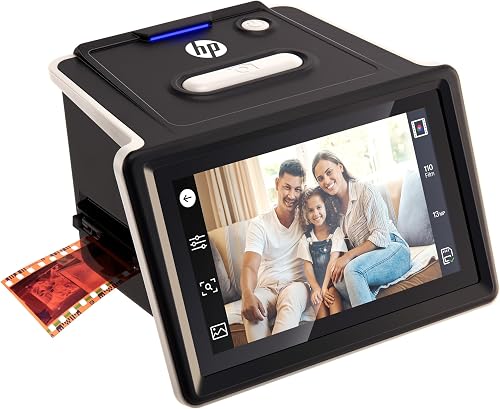
HP Film and Slide Scanner FS500: Best touchscreen controls
- 13MP CMOS sensor with 22MP interpolation
- 5-inch all-angle touchscreen
- 135, 126 and 110 negatives and slides
- Quick-load tray
- USB-C
HP's compact model uses a touchscreen for preview and editing. The quick-load tray suits buyers scanning a full box of slides in one sitting.
Pros
- Touchscreen editing without a computer
- Compact body at 5.7 inches wide
- USB-C connection
- 1-year limited warranty
Cons
- No Super 8 film support
- Smaller sensor than the Magnasonic
The HP FS500 suits someone who likes tapping through menus. Its 5-inch all-angle touchscreen lets you preview and adjust a scan without hunting for buttons, and the quick-load tray speeds up batch work.
Inside is a 13MP CMOS sensor with 22MP interpolation. HP supports 135, 126 and 110 negatives and positive slides, so most 35mm collections fit; Super 8 does not.
The touchscreen also carries the editing, so you can tweak a scan to taste before saving it. Color depth is 24 bits.
The body is compact at 5.7 inches wide and 13.4 ounces, which helps on a crowded desk. It connects by USB-C, so moving files to a newer laptop is straightforward.
HP lists support for Windows 10 or later and macOS 10.15 or later. The all-angle screen means you can tilt it toward you whether the scanner sits high or low.
Its place in the lineup is clear: the best touchscreen option before you move up to the 7-inch HP. If a box of slides is the whole job and you like a phone-style interface, this one is quick and pleasant to use.
The 1-year limited warranty is the shorter side of the HP pair.
HP Film and Slide Scanner with 7-Inch Screen: Best for viewing on a big screen
- 13MP CMOS sensor
- 7-inch LCD touchscreen
- 135, 126 and 110 formats with a 50mm adapter
- Gallery mode
- USB and HDMI
A larger 7-inch touch display makes this a comfortable scanner for reviewing a scanned image before you save it. Gallery mode doubles as a digital frame.
Pros
- 7-inch touchscreen
- Crop and adjust directly on the display
- Gallery mode for slideshows
- HDMI and USB connections
Cons
- Heavier than the 5-inch models
- No Super 8 film support
HP's larger model puts a 7-inch touch display on the desk. Bigger previews make it easier to spot a dusty slide or a badly faded frame before you save it.
The 13MP CMOS sensor handles color and black-and-white negatives, and the quick-feed loading tray with a 50mm adapter works through 135, 126 and 110 formats. Built-in crop and color tools mean no separate software for basic fixes.
A gallery mode shows your scans as a slideshow when the scanning is done.
HDMI lets you show scans on a TV, and USB handles transfers to a computer. The display is rated at 1200 dpi, and the body measures 4.72 by 6.89 by 4.57 inches.
The bigger screen matters most when you are culling a large box and want to judge each frame before saving.
It is heavier than the 5-inch models, so it stays put rather than traveling. Pick it for comfortable viewing and light editing on the device; skip it for Super 8 or if desk space is tight.
It carries a 1-year limited warranty.
ClearClick QuickConvert 2.0: Best for photo prints and slides together
- Scans 4x6 photos, 35mm slides and negatives
- 14MP sensor with 22MP interpolation
- 5-inch preview screen
- Built-in rechargeable battery
- Scans without removing photos from albums
A hybrid scanner that handles loose prints as well as slides and negatives. The built-in battery means cordless scanning at the kitchen table.
Pros
- Scans photos and film in one device
- Cordless battery operation
- Album-page scanning without removal
- 2-year warranty
Cons
- One item at a time, no autofeeder
- 5x7 photos not supported
The ClearClick QuickConvert 2.0 is the odd one out in a useful way. It scans 4x6 prints as well as 35mm slides and negatives, covering a mixed box of photos and slides in one pass.
It reads 110 and 126 negatives too.
The 14MP sensor interpolates to 22MP, and the 5-inch screen shows each photo before you save. A built-in rechargeable battery lets you work away from an outlet, and it can scan a photo still in an album page or mount.
A size button switches the scan between print and film.
The limit is speed and size: it takes one item at a time with no autofeeder, and 5x7 prints are not supported. Each scan takes 2 to 3 seconds.
ClearClick backs it with a 2-year warranty and US tech support. A CIS sensor is used here rather than the CMOS found in the dedicated film models.
It is also the bulkiest of the group at 2.4 pounds, so it stays on the table.
Reach for it when half the archive is loose prints. For slides alone, the Virtuoso 2.0 or the Kodak will be faster.
BEONEGLOBAL ClearScan P7: Best for a large screen and SD card in the box
- 24MP CMOS output
- 7-inch LCD
- 35mm, 135, 126, 110, Super 8 and 8mm film and slides
- SD card included
- One-touch scan and color edit
A new design with a 7-inch screen, 24MP output and an SD card in the box, so you can start scanning right away.
Pros
- SD card included
- Large 7-inch display
- Buttons placed below the screen
- 1-year manufacturer warranty
Cons
- USB only, no HDMI
- Newer brand with a shorter track record
The BEONEGLOBAL ClearScan P7 is a recent design with a 7-inch screen and buttons placed below the display, a small comfort win over top-mounted controls.
It scans at up to 24MP on a 1/2.3-inch CMOS sensor, and covers 35mm, 135, 126, 110, Super 8 and 8mm film. An SD card comes in the box, so there is no extra purchase before the first scan.
The body measures 4.1 by 7.1 by 6.1 inches and weighs 15.68 ounces.
One-touch scan and edit keeps the workflow simple, and the image-size adjustment lets you frame what gets saved. The 3600 dpi rating and 24-bit color depth are listed alongside the 24MP output.
It is USB only, so a TV slideshow needs a different model.
It slots in as a budget-friendly large-screen option, especially if you also have Super 8 reels. The shorter track record of a newer brand is the reason it sits at the bottom of this list; it carries a 1-year manufacturer warranty.
How the slide scanners compare side by side
The table below lines up the eight scanners on the facts that decide most buyers: output, screen and the formats in the box. Read across a row to see where each one pulls ahead.
| Product | Best for | Resolution | Screen | Film formats | Our score |
|---|---|---|---|---|---|
| Kodak Slide N Scan | most home slide collections | 22MP | 5 in LCD | 135, 110, 126, 50mm slides | 8.8 |
| ClearClick Virtuoso 2.0 | warranty coverage | 22MP interpolated | 5 in LCD | 35mm, 110, 126, 50mm slides | 8.4 |
| Kodak Scanza | mixed film archives | 14MP, 22MP interpolated | 3.5 in LCD | 35mm, 126, 110, Super 8, 8mm | 8.1 |
| Magnasonic 24MP All-in-One Film Scanner | Super 8 and larger files | 24MP | 5 in LCD | 35mm, 110, 126, Super 8, slides | 7.9 |
| HP Film and Slide Scanner FS500 | touchscreen controls | 13MP, 22MP interpolated | 5 in touchscreen | 135, 126, 110 | 7.7 |
| HP Film and Slide Scanner with 7-Inch Screen | viewing on a big screen | 13MP | 7 in touchscreen | 135, 126, 110, 50mm slides | 7.4 |
| ClearClick QuickConvert 2.0 | photo prints and slides together | 14MP, 22MP interpolated | 5 in LCD | 4x6 photos, 35mm, 110, 126 | 7.3 |
| BEONEGLOBAL ClearScan P7 | a large screen and SD card in the box | 24MP | 7 in LCD | 35mm, 126, 110, Super 8, 8mm | 6.9 |
Our score weighs specs, features and the formats a home scanner actually needs against what you're shopping for. A scanner that only covers 135 film starts from a weaker position than one that also reads Super 8.
How we compared these slide scanners
We compared the specs on each scanner: sensor and output resolution, screen size, supported film and slide formats, memory and connections. We weighed how the controls are laid out and what comes in the box.
Sensor type counted too, since a CCD or CMOS chip and a CIS chip behave differently on faded film.
We did not test these devices ourselves. The details come from the manufacturers and the product data, and we ranked each one by how well its combination fits a typical home slide archive.
Format coverage carried the most weight, then screen size and loading speed, then extras like a warranty or an included SD card.
What is the best slide scanner to buy if your slides are mostly 35mm?
Most family slide boxes are 35mm, and almost every scanner here handles them. Pick by screen and loading speed rather than format.
The Kodak Slide N Scan and ClearClick Virtuoso 2.0 both take 50mm slides through quick-load holders. Our guide to the best scanner for 35mm slides goes deeper on that format alone.
35mm slides only
If 35mm and 50mm slides are the whole job, choose between the Kodak for the bigger screen and the ClearClick for the warranty. The Kodak's 22MP sensor and 5-inch LCD make it the smoother first buy for a single box.
The ClearClick's faster scan time matters more if you have several boxes and a deadline.
35mm negatives too
Negative strips from the same era fit the same trays. The best slide and negative scanner roundup covers strip handling in more detail.
Check that the adapters for 135 film are included before you order, since a mounted-slide holder alone will not feed a negative strip. The HP pair and the P7 all list 135 among their formats.
Do you need Super 8 or 8mm support?
Only three scanners here read Super 8 and 8mm film: the Kodak Scanza, the Magnasonic FS71 and the ClearScan P7. If your archive has home movie reels, that cuts the list fast.
The Kodak Slide N Scan, both HP models and the ClearClick pair stop at still film and slides.
Scanning movies as stills
Each frame is captured as a still image, not video. Budget time: a short reel holds thousands of frames, so most people digitize selected moments rather than every frame.
The Scanza and P7 both list 8mm alongside Super 8; the Magnasonic lists Super 8.
Mixing reels and slides
The Magnasonic gives the highest pixel count of the three at 24MP and a 5-inch screen. The Scanza is smaller and cheaper to fit on a shelf.
The P7 pairs 24MP with a 7-inch screen and an SD card in the box, but skips HDMI.
Which features make slide scanning quicker?
A preview screen, easy-load trays and on-device editing do the most to shorten a long scanning session. Touchscreens and HDMI save time at the review stage.
Screen size and touch
A 5-inch screen is enough to judge focus and color. Move to 7 inches if you plan to cull and edit on the device rather than on a computer.
The two HP models offer touch control, and the HP pair also handle crop and color on the screen.
Loading trays and adapters
Quick-load trays with continuous feeding beat removing and refitting a holder for every slide. Check the inserts match your film sizes before buying.
The Kodak Slide N Scan includes 50mm, 135, 110 and 126 holders; the Scanza uses numbered inserts and trays so you can find the right one at a glance. The HP FS500 and the P7 both use a quick-load tray to keep a long session moving.
Memory and connections
Every scanner here saves to an SD card, and most cap at 128GB except the Kodak Slide N Scan, which lists 32GB. HDMI appears on the Kodak pair, the Magnasonic and the 7-inch HP; the P7 is USB only.
The HP FS500 is USB-C, which suits a newer laptop without an adapter. The ClearClick Virtuoso uses a mini HDMI cable that you supply yourself.
Can a slide scanner replace a flatbed for photos and paper?
No. A slide scanner reads film through a small sensor and a light box; it cannot scan a flat print or a document.
For paper archives, pair it with a document scanner.
A clear reason to pick a duplex scanner for home use is paperwork; it is the right tool for receipts and letters. Photos are a separate job again, and our home scanner for photos guide explains the flatbed route.
Slide scanner plus a flatbed
If you have both film and prints, one of each covers everything. The home scanner for photos picks show which flatbeds suit family collections.
One device for prints and slides
The ClearClick QuickConvert 2.0 is the only scanner here that reads 4x6 prints and slides. It suits small mixed jobs, not a full print archive.
Its battery and album-page trick help when prints are stuck in a book.
Should you buy a slide scanner or send the slides to a service?
Buy a scanner if you plan to digitize more than one box of slides over the years, or you want to review each frame as it goes. A service makes sense for a single small batch.
Doing it at home
Home scanning puts you in charge of cropping and re-scanning a poor frame. It also spreads the job over evenings rather than one large fee.
The on-device color and brightness controls on most models let you rescue a faded slide without extra software. The Magnasonic's RGB adjustment and the HP touchscreens are the handiest for this.
Knowing the time cost
At 1 to 5 seconds a slide, the scanning is quick; the sort, labeling and checking take longer. Plan a few sessions rather than one marathon.
A 7-inch screen helps here, because you can spot a bad frame before it joins the folder. With a 1-second scanner like the ClearClick you can afford to re-scan a batch you got wrong.
Verdict
The best slide scanner to buy for a home archive is the Kodak Slide N Scan, because it covers 135, 110 and 126 film and 50mm slides, previews each frame on a 5-inch screen, and needs no computer. Pick the ClearClick Virtuoso 2.0 if you want the longer warranty and the quickest scan time.
For Super 8 and 8mm reels, the Magnasonic FS71 or Kodak Scanza handles formats the Kodak and ClearClick skip. For mixed slides and prints, the QuickConvert 2.0 covers both.
Any of these will get a family archive onto an SD card this month.
Our top 3 picks at a glance
-
1
-
2
-
3
Frequently asked questions
What is the best slide scanner to buy for home use?
For most homes the Kodak Slide N Scan covers the common slide sizes, previews each frame on a 5-inch screen, and runs without a computer. Pick a different model only when you need Super 8 film, a longer warranty or print scanning.
Do I need a computer to scan slides?
No. All eight scanners here save scans to an SD card on their own, so a laptop is optional.
You only need a computer to copy files across or to edit them in software afterwards.
Which slide format should you check first?
Measure a few slides before you buy. The Kodak Slide N Scan and most picks here take 50mm slides plus 135, 110 and 126 film.
Super 8 and 8mm movies work on the Kodak Scanza, Magnasonic FS71 and ClearScan P7.
Can a slide scanner also handle negatives?
Yes. Every scanner here reads negative strips as well as mounted slides.
The adapters for 135, 110 and 126 film come in the box on most models.
How long does it take to scan a box of slides?
A single slide scans in about 1 to 5 seconds depending on the model. A full tray of 100 slides usually takes under half an hour once you are used to loading the inserts, plus time to check and re-scan any frames.
Is a dedicated slide scanner better than a flatbed?
For a box of mounted slides, yes. A dedicated scanner loads slides through a tray and previews them on a built-in screen.
A flatbed suits prints and odd sizes, which is why our home scanner for photos guide covers that route.