How Does a Slide Scanner Work?
A slide scanner works by shining a light through the slide and capturing the image with a small digital camera or line sensor. The light source sits behind the slide, the lens focuses the film frame onto the sensor, and the scanner saves the result as a JPEG or TIFF file.
On this page (10 sections)
- What is inside a slide scanner?
- How does a slide scanner turn film into a digital image?
- What does the light source do?
- How do the slide holders and trays work?
- How do you set up and run a slide scanner?
- What affects the quality of a slide scan?
- Do you need a computer to scan slides?
- Which home slide scanners put these parts together well?
- How do you keep a slide scanner working well?
- Quick recap
A slide scanner works by shining a light through the slide and capturing the image with a small digital camera or line sensor. The light source sits behind the slide, the lens focuses the film frame onto the sensor, and the scanner saves the result as a JPEG or TIFF file.
That is the short answer to how does a slide scanner work. The rest comes down to the light path, the sensor and the way each model moves the slide past the capture point.
Below, we break down the parts and what each one does for the final image.
What is inside a slide scanner?
A slide scanner has four core parts: a light source, a slide holder, a lens and a sensor. Together they replace the projector you would have used to view the slide and the camera you would have used to copy it.
The light sits on one side of the slide and the lens on the other. The holder keeps the film flat and square to the lens so the frame fills the sensor evenly.
The sensor converts the light that passes through the film into pixels.
Most home scanners add a small screen and a memory card slot, so the whole process happens in one box. A dedicated film scanner splits those jobs across a computer instead.
For a comparison of the flatbed route, see how does a flatbed scanner work.
How does a slide scanner turn film into a digital image?
The scanner passes light through the film, focuses the image and samples it into pixels. Each pixel records how much red, green and blue light reached it, and the scanner writes those values into an image file.
A slide is a transparent positive. The colors you see are the light that made it through the dyes in the film.
A scanner reads the same light with a sensor instead of your eye.
The sensor divides the frame into a grid. A 22MP sensor like the one in the Kodak Slide N Scan records millions of tiny samples across each slide.
The scanner then saves the grid as a file you can open, edit and print.
Camera scanners and line scanners
Camera scanners capture the whole frame at once; line scanners build the image row by row. Camera scanners are the common design in home slide and film scanners.
A small camera takes a snapshot of the lit slide, much like a phone photo of a projector screen.
Line scanners move the film past a fixed row of sensors and record one line at a time. This takes longer per frame.
Camera scanners are faster and simpler for a box of family slides. The Kodak Scanza is a camera scanner: a 14MP sensor takes a snapshot of each film frame.
For dedicated machines that specialize in film, see our guide to the best slide and negative scanner.
What does the light source do?
The light source illuminates the film from behind so the sensor can read the image. Without a light behind the slide, the film would only show as a dark rectangle.
The light needs to be even across the whole frame. Bright spots or dim corners show up as color casts in the scan.
A small diffuser in front of the lamp spreads the light so each slide gets the same illumination.
This is also why a slide scanner needs a cleaning routine. Dust on the light box or on the slide itself blocks light and leaves specks in the scan.
Kodak includes a cleaning brush with both the Slide N Scan and the Scanza for exactly this job.
How do the slide holders and trays work?
The holders and trays position each slide or film strip in the light path. A well-seated slide sits flat, centered and square, so the frame lands inside the sensor's view.
Kodak's Slide N Scan uses easy-load inserts. A 50mm slide holder takes standard slides, and three adapters handle 135, 110 and 126mm film.
The quick-feeding tray lets you load one slide after another without pulling the holder out each time.
The Scanza uses three numbered slide inserts and multiple film adapters. Both designs are faster than placing each slide on a flatbed and closing the lid.
How do you set up and run a slide scanner?
Setup takes a power connection, an SD card and a few minutes with the holders. After that, each slide is a load, a preview and a save.
- Insert an SD card. The Slide N Scan needs one to operate and supports SD or SDHC cards up to 32GB.
- Connect power. The Scanza uses an AC adapter and also ships with USB, HDMI and video cables.
- Pick the right holder for your slide size and seat the first slide.
- Adjust film type, color, brightness and date if you want them stored with the file.
- Capture, then move to the next slide and repeat.
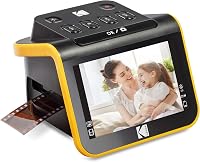
The Slide N Scan's 5-inch LCD shows each frame before you save it. The Scanza's 3.5-inch screen tilts and has adjustable brightness.
Both let you review a session without a computer.
What affects the quality of a slide scan?
Scan quality depends on sensor resolution, light evenness, slide flatness and how clean the slide is. The scanner only records what the light carries through the film.
Resolution sets the ceiling. A 22MP capture holds more fine detail than a 14MP one.
That matters when you plan to print a slide large or crop into a face in a group shot. Kodak's Scanza has a 14MP sensor with an optional interpolation setting that lifts the output to 22 megapixels.
Dust and scratches are the bigger practical factor. Clean slides first, and use the included brush on the light box as Kodak suggests.
The Puomue cloth set helps keep the glass surfaces clean between batches. It's a 6-pack of 16 x 16 inch microfiber cloths that the brand describes as soft and lint free.
They also work for the screen and the scanner's exterior.
Do you need a computer to scan slides?
No, you don't. A standalone slide scanner has its own screen and saves to a memory card, so the whole workflow runs without a computer.
You only need one later to move files onto a drive or into editing software.
That matters for readers with a box of slides and no patience for drivers. Plug in, scan, pull the card and copy the files when it suits you.
A dedicated film scanner usually relies on a computer, which offers finer control but takes more setup.
If your main goal is to get family slides into digital files quickly, a standalone model is the simpler path. Our roundup of the best scanners for 35mm slides covers the standalone and computer-based options side by side.
Which home slide scanners put these parts together well?
The best fit depends on how many slides you have and whether you want a big screen or a small footprint. Both Kodak models use the same light-through-film design, so the differences come down to capacity and controls.
Kodak Slide N Scan: the easier pick for a large box of slides
The Slide N Scan is the better fit for most households with several hundred slides. Its 22MP sensor gives you more detail to work with, and the 5-inch screen makes previewing comfortable for long sessions.
The continuous-loading tray lets you keep feeding slides without lifting the holder out between frames. It saves directly to an SD card and connects by USB-C or HDMI.
One trade-off: you must supply the SD card, since the scanner won't run without one. It's also the model to compare first in our guide to what is the best slide scanner to buy.
Kodak Scanza: the smaller, more portable option
The Scanza suits a smaller batch or a tighter desk. Its 14MP camera handles 35mm, 126, 110, Super 8 and 8mm film, and its 3.5-inch screen tilts for a better viewing angle.
Kodak states plainly that it takes a snapshot rather than a high-resolution scan. That's fine for sharing and quick digital copies.
Super 8 film converts to still frames, not video.
The numbered inserts and trays make loading clear for a first-time user. It's the lighter-duty choice, while the Slide N Scan is the higher-capacity one.
How do you keep a slide scanner working well?
Clean the slide, the light box and the screen, then store the scanner and its holders where dust can't settle. Small habits keep scans sharp and save you re-scanning later.
Wipe each slide with a dry microfiber cloth before it goes in the holder. Blow loose dust off the light box with the included brush.
Wipe the screen with a cloth, never a wet paper towel.
Keep the inserts and trays together in a bag or box. Missing adapters are the usual reason a session stops short.
Handle slides by the mount, not the film frame, so you don't add fingerprints.
When you've finished a batch, copy the card to two places: a computer and a backup drive. A card left in a drawer is not a backup.
That way the answer to how a slide scanner works becomes a set of files you can keep for good.
Quick recap
A slide scanner works by backlighting each slide and photographing it onto a sensor. The holder keeps the frame flat, the light and lens set the exposure and the sensor records the pixels.
Pick the Slide N Scan for a bigger screen and more resolution on long batches, or the Scanza for a compact, tilting-screen setup. Whichever you choose, clean slides and a two-copy backup matter as much as the scanner itself.
Frequently asked questions
What image format does a slide scanner save?
Most home slide scanners save JPEG files directly to an SD card. Dedicated film scanners and some flatbeds also save TIFF, which keeps more detail for later editing and creates larger files.
Can a slide scanner digitize negatives too?
Many models handle both. The Kodak Slide N Scan and Kodak Scanza both accept slide holders and negative adapters for 135, 110 and 126 film, so you can scan slides and strips in the same session.
How long does it take to scan a box of slides?
It depends on the machine. A feed-through scanner can capture one slide after another in a few seconds each, while a flatbed setup needs the slide placed and previewed for every frame.
Plan an hour or two for a few hundred slides either way.
Do I need a computer to use a slide scanner?
No. Standalone film scanners have a built-in screen and save to an SD card, so you can scan without a computer.
You only need a computer or card reader to move files onto a drive or into editing software afterward.
Why do my scans look flat or dull?
Slides carry a lot of contrast and color in a small frame. Flat scans usually come from dust on the slide or light box, a low-resolution setting or overexposed originals.
Clean each slide and try the scanner's brightness or color controls before assuming the machine is at fault.