How Does a Flatbed Scanner Work?
A flatbed scanner captures an image by shining light on an item placed on glass and reading the reflected light with a sensor. The scanner turns that reading into a digital file.
On this page (9 sections)
- What does flatbed mean on a scanner?
- How does a flatbed scanner capture an image?
- What happens between pressing Scan and getting a file?
- What can you scan on a flatbed scanner?
- What are the main parts of a flatbed scanner?
- What affects a flatbed scan's quality?
- Which flatbed scanner features may help at home?
- When should you choose a flatbed scanner?
- Does a flatbed scanner move the photo?
A flatbed scanner works by shining light on an item placed on glass and measuring the reflected light with a sensor. It moves the light and sensor beneath the glass, reads the image line by line, and converts the result into a digital file.
The glass keeps the item steady during capture. That makes this kind of scanner useful for photos, artwork, book pages, and loose documents that you scan one at a time.
What does flatbed mean on a scanner?
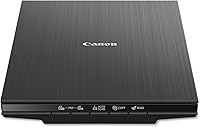
“Flatbed” means the scanner has a flat glass surface where you place the item face down. A lid usually covers the item, and the scanner reads it from beneath the glass.
The name describes how you load material. Unlike a sheet-fed scanner, a flatbed scanner doesn't pull a page through rollers to scan it.
You can place a photo or paper on the glass, close the lid, and start the scan. For a book, you scan one page at a time and let the spine sit near the scanner's edge.
How does a flatbed scanner capture an image?
A light source illuminates the item, and a sensor reads the light reflected back through the glass. The scanner records a narrow strip at a time as the scanning mechanism travels beneath the item.
A mirror and lens system directs the reflected light toward the sensor in some scanners. Other designs place a contact image sensor close to the glass, reducing the need for a longer optical path.
Color sensors separate the reflected light into color information. The scanner then turns the sensor readings into pixels, which software saves as an image or document file.
A scanner's optical resolution describes the detail its sensor can capture. A higher resolution can help when you need to enlarge a small photo or preserve fine detail, though it can also make larger files and take more time.
What happens between pressing Scan and getting a file?
Scanning software controls the capture and turns sensor readings into a file you can save. It may let you choose color, resolution, file type, and where the scan goes.
The usual steps are:
- Place the item face down on the glass.
- Align it with the scanner's guide marks.
- Close the lid or lower it gently over the item.
- Choose a scan mode and destination in the software.
- Start the scan and review the saved file.
Some scanners also offer one-touch buttons or automatic settings. The options depend on the scanner and its software.
What can you scan on a flatbed scanner?
Flatbed scanners can scan photos, documents, artwork, and book pages that fit on the glass. They suit items that need to stay still while the scanner reads them.
A flatbed can also handle fragile or irregular items that might not feed smoothly through rollers. Check the scanner's usable glass area before buying if you plan to scan large papers, prints, or albums.
For family photos, clean the glass and place each photo straight to help avoid marks and crooked scans. Our guide to scanning old photos to a computer covers setup and file saving.
Can you scan a book with a flatbed scanner?
Yes, you can scan a book one page at a time by placing each open page against the glass. A scanner with a high-rise or removable lid can leave extra room for thicker books and albums.
Keep pressure light, especially near the spine. If the book does not lie flat, accept some shadow or unevenness near the binding rather than forcing it down.
Can you scan more than one photo at a time?
You can place several small photos on the glass at once, then separate their images in scanning software if it supports that feature. Leave space between photos so the software can detect their edges.
This approach can save repeated loading, but it may take extra time to crop and name each file. See how to scan multiple photos at once for a step-by-step method.
What are the main parts of a flatbed scanner?
The glass, light source, sensor, and scanning mechanism work together to capture an image. The lid helps hold the item in place and can block outside light.
- Glass: supports the photo, document, or page during scanning.
- Light source: illuminates the item so the scanner can read it.
- Sensor: measures reflected light and converts it into digital information.
- Scanning mechanism: moves the light and sensor beneath the glass.
- Lid: covers the item and helps keep it steady.
The sensor type affects how the scanner captures light. For a plain-language comparison, see what a CCD scanner is.
What affects a flatbed scan's quality?
Resolution, the condition of the glass, item placement, and scan settings all affect the result. Choose settings for the job instead of using the highest resolution every time.
Higher resolution captures more detail but creates larger files. For more guidance, read what resolution to scan photos at.
Dust or smudges on the glass can show up in scans, so clean it with a soft cloth and follow the scanner's care instructions. Keep the item aligned, and check the preview before saving a large batch.
The file type also matters. JPEG files are convenient for sharing, while some workflows call for a format that preserves more image information; our guide to [TIFF vs.
JPEG for scanned photos](/tiff-vs-jpeg-photo-scanning/) explains the tradeoffs.
Which flatbed scanner features may help at home?
For home photo and document scanning, look for a glass area that fits your items, usable software, and a lid that suits the material you scan. A higher optical resolution can be useful when you want to enlarge photos or capture fine detail.
The Epson Perfection V39 II has 4800 dpi optical resolution, one-touch scanning, and a high-rise removable lid for bulky items such as books and photo albums. Its software can stitch oversized images together.
The Epson Perfection V19 II also has 4800 dpi optical resolution, one-touch scanning, and a high-rise removable lid. It can scan photos, artwork, books, and documents.
The Canon CanoScan LiDE 300 has 2400 x 2400 dpi optical resolution and Auto Scan Mode, which detects what you're scanning. Its four EZ buttons include a PDF button.
For a broader comparison of scanning types, see the plain guide to home scanners. If you're weighing a flatbed against an all-in-one printer, read flatbed scanner vs. printer scanner.
When should you choose a flatbed scanner?
Choose a flatbed scanner if you mainly scan photos, book pages, artwork, or loose papers one at a time. Its glass surface keeps each item in place while the scanner captures it.
A feeder may be more useful if you regularly scan stacks of documents and want to process multiple pages in sequence. For large photo collections, compare the time needed for individual scans with an auto-feed photo scanner.
Pick a flatbed for flexible single-item scanning and a feeder for batches of paper. If photos are your main concern, start with home scanners for family photos.
Does a flatbed scanner move the photo?
No, the photo stays still on the glass while the scanning mechanism moves beneath it. This is why you should keep the lid closed and avoid touching the item until the scan finishes.
The scanner reads the image in narrow lines and combines them into a complete file. Keeping the item still helps prevent a blurred or misaligned result.
Frequently asked questions
What does flatbed mean on a scanner?
A flatbed scanner has a flat glass surface where you place an item to scan. A lid covers it while a light and sensor move beneath the glass to capture the image.
This design lets you scan loose sheets, photos, book pages, and other flat items one at a time.
How does a scanner turn a photo into a digital image?
A scanner measures light reflected from the photo and converts those measurements into digital image data. Its sensor reads the image in narrow lines as the scanning mechanism moves, then software assembles those lines into a file you can save.
Can a flatbed scanner scan a book?
Yes, a flatbed scanner can scan book pages one at a time. Open the book and place a page against the glass, keeping it as flat as the hinge allows.
A removable or high-rise lid can make room for thicker items, but avoid pressing hard on a fragile spine.
Is a flatbed scanner better for photos than a document feeder?
A flatbed scanner is often a better fit for loose photos, artwork, and bound pages because each item rests on glass. A document feeder is more convenient for processing stacks of paper.
Choose based on what you scan most and whether you need single-item care or faster batches.