Flatbed Scanner vs Printer Scanner: Which Scans Better? (October 2026)
A flatbed scanner is the better fit for photos, books and careful one-page scans; an all-in-one printer suits everyday paper tasks. Choose by what you scan most and whether you need printing or automatic document feeding.
On this page (6 sections)
A flatbed scanner is the better fit for photos, books and careful one-page scans; an all-in-one printer suits everyday paper tasks. The flatbed scanner vs printer scanner choice comes down to what you scan most and whether you also need a printer.
A flatbed gives you a glass surface where you place each photo, page or book. An all-in-one printer combines scanning with printing and copying, and some models add an automatic document feeder for paper stacks.
If you mostly handle family photos, see our guide to the best scanner for home use. For batches of bills and forms, an automatic document scanner may save more time than a flatbed.

Flatbed scanner vs printer scanner: which scans better?
A flatbed is usually the more flexible choice for photos and bound items; an all-in-one can be more convenient for loose pages. The exact scan quality and speed depend on the model, not just the machine type.
A flatbed holds an item stationary against the glass while the scanner captures it. That makes it a natural fit for delicate prints, artwork and pages that cannot pass through a feeder.
An all-in-one may use a flatbed for one page at a time or include an automatic document feeder for several sheets. Check which scanning method a specific printer uses before comparing its convenience with a dedicated scanner.
What does a flatbed scanner handle well?
A flatbed is useful when you need to scan different types of items, including photos, artwork, documents and books. A removable or high-rise lid helps when an object is too thick for a standard cover to lie flat.
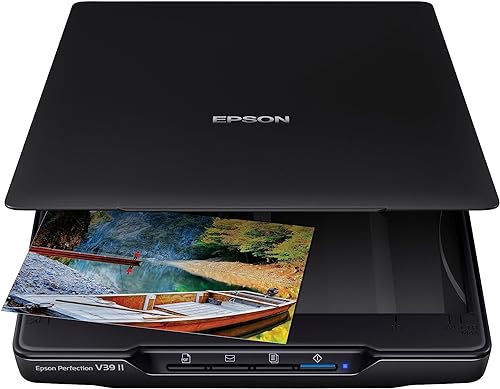
The Epson Perfection V39 II has 4800 dpi optical resolution, a removable high-rise lid and Easy Photo Fix color restoration. Epson also describes stitching for oversized images, which can help when a single item is larger than the scan area.
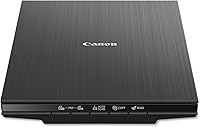
The Canon CanoScan LiDE 400 offers 4800 x 4800 dpi resolution, color restore and dust removal features. Its maximum document size is 8.5 x 11.7 inches, so measure larger originals before choosing it.
For old family prints, follow our steps for scanning old photos to a computer. If resolution is your main concern, our photo scanning resolution guide explains how to choose a setting for the image and its intended use.
What does an all-in-one printer scanner handle well?
An all-in-one makes sense when printing and copying are regular needs alongside scanning. It keeps those jobs in one machine, so you don't need a separate printer and scanner on the desk.
Some all-in-ones include an automatic document feeder. That can help with multi-page paperwork, but feeder capacity, double-sided scanning and scan speed vary by model.
A dedicated document scanner can offer a more focused paper workflow. The ScanSnap iX1300, for example, scans both sides of a sheet and supports USB or Wi-Fi, but it is not a flatbed for bound books.
Which is better for old photos?
Choose a flatbed for old photos you want to place and scan one at a time. It avoids feeding prints through a paper path and gives you room to position each image carefully.
The V39 II and LiDE 400 both offer 4800 dpi resolution. The Epson adds one-click color restoration for faded photos, while the Canon includes color restore and dust removal enhancements.
Resolution is only one part of the result. Clean the scanner glass, place the photo straight, and save a high-quality master before making smaller copies for sharing.
An all-in-one with a flatbed can also scan photos. The question is whether its software, resolution and controls fit your needs, and whether you want to keep a separate dedicated scanner on the desk.
Which is better for documents and receipts?
Choose an automatic feeder for repeated batches of loose paper; use a flatbed for one-off pages, receipts or items that should not go through a feeder. A printer scanner may combine both options, depending on its design.
For a few documents, a flatbed works well enough if you don't mind placing each page by hand. It can also handle paper that is too small, fragile or irregular for a feeder.
For a stack, an automatic feeder reduces handling. The ScanSnap iX1300 has a 20-sheet capacity and duplex scanning, while the Canon LiDE 400 offers buttons for scanning and saving multi-page PDFs.
If you scan lots of paperwork, our guide on choosing a document scanner for your home desk covers the features to compare. Think about page volume, double-sided originals and whether wireless scanning matters.
How do space and connections compare?
A flatbed needs a clear surface for opening its lid; a document feeder needs room to load and retrieve paper. Measure the space around the machine, not only its footprint.
The V39 II is USB-powered and has a built-in kickstand for vertical placement and storage. Its removable lid can help with bulky originals, but you'll need a stable, flat surface while scanning.
The LiDE 400 uses USB only, with one included USB Type-C cable for data and power. It has no wireless connection, so plan on placing it near the connected computer.
The iX1300 supports USB and Wi-Fi and can send scans to computers, mobile devices and cloud services. That flexibility can suit a shared home office, while a basic flatbed may be simpler when you scan at one desk.
Does an all-in-one save money and space?
An all-in-one can reduce the number of devices if you need to print and copy as well as scan. A dedicated scanner makes more sense when scanning quality or a specific workflow is the main priority.
Compare the space each machine needs with the functions you will use. A printer that sits unused most days may not be a useful space saver, while a dedicated scanner adds little value if you rarely scan.
Also consider the originals. A printer with a flatbed can cover occasional photos and documents, but a dedicated scanner may offer features that better match regular photo work or paper batches.
Which scanner should you choose?
Pick a flatbed for careful photo and book scanning, and an all-in-one printer for a mix of printing, copying and occasional scans. If paper stacks are your main job, compare feeder capacity and duplex scanning before deciding.
Choose the Epson Perfection V39 II for a dedicated flatbed with a removable lid and photo restoration. Choose the Canon CanoScan LiDE 400 for a straightforward USB flatbed with 4800 x 4800 dpi resolution and multi-page PDF buttons.
Choose an all-in-one if you need a printer in the same machine. For frequent stacks of paperwork, consider a dedicated feeder scanner such as the ScanSnap iX1300, which offers duplex scanning and USB or Wi-Fi.
For family prints, start with our guide to scanning old photos. For paperwork, compare your page volume and feeding needs with the advice in our document scanner guide.
Frequently asked questions
Is a flatbed scanner better than a printer scanner for photos?
A flatbed is usually the more suitable choice for careful photo scans because you place each photo on a glass bed and can scan items one at a time. The Epson Perfection V39 II offers 4800 dpi optical resolution and one-click color restoration for faded photos.
Can an all-in-one printer scan books?
A flatbed on an all-in-one can scan a book one page at a time if the book fits and the lid can close or lift safely. A dedicated flatbed with a removable or high-rise lid can be more practical for bulky books, but check the exact model's design.
Is a flatbed scanner faster than an all-in-one printer scanner?
It depends on the task. A flatbed handles one item at a time, while an all-in-one with an automatic document feeder can process a stack without placing each page by hand.
For a handful of photos, feeder speed may matter less than careful placement.
Should I buy a scanner or an all-in-one printer?
Choose an all-in-one if you need printing, copying and occasional scans in one machine. Choose a dedicated scanner if scanning is the main job and you want a flatbed for photos or books, or an automatic feeder for paper batches.