How to Choose 35mm Slide Scanners for Home Film Digitizing
Pick a flatbed if you also scan prints and mixed formats, and a dedicated 35mm scanner if slides are your whole job. Resolution, film holders, dust handling and your monthly volume decide the rest.
On this page (9 sections)
- What should you check first in 35 mm slide scanners?
- How much resolution do you really need for 35mm slides?
- Which scan type fits your slide collection?
- Do you need Digital ICE or infrared dust removal?
- What film holders and trays come in the box?
- How do flatbed and dedicated 35mm scanners compare in daily use?
- What software and computer setup do slide scanners need?
- How should you plan a scanning workflow for a big slide collection?
- Which of these slide scanners fits your home project?
The best 35 mm slide scanners split into three jobs: flatbeds for mixed photo and film work, dedicated film scanners for archive-grade 35mm, and standalone units for quick sharing. Most homes with a shoebox of slides are best served by a dedicated 35mm scanner or a standalone unit, and the choice turns on volume and how much you care about the final file.
This guide walks through the specs that matter, the accessories that quietly decide whether scanning works at all, and the workflows that keep a weekend project from turning into a month. Three current models anchor the advice, each covering a different buyer.
What should you check first in 35 mm slide scanners?
Start with film format and optical resolution, because those two decide whether a scanner can do your job at all. A 35mm slide is a small frame, so the scanner needs a light source behind the film and enough real detail to enlarge the result.
35mm slides come mounted in cardboard or plastic frames. The scanner needs a holder that accepts those mounts, not just bare film strips.
Kodak's Slide N Scan bundles a 50mm slide holder plus adapters for 135, 110 and 126 film. Epson's V850 Pro includes film holders for slides and strips.
Plustek's 8200i SE ships with two film holders and two slide holders.
Optical resolution is the number that matters. Interpolated resolution inflates the figure without adding detail.
The Epson model reaches 6400 dpi with its dual lens system. The Plustek reaches 7200 x 7200 dpi for 35mm negatives and mounted slides.
The Kodak works in megapixels instead: a 22MP sensor for its film and slide conversion.
Check the connection and output too. USB covers the flatbed and the Plustek.
The Kodak adds HDMI and saves to an SD card, which matters if you want to skip a computer entirely.
Set a hard floor of 2400 dpi optical and a working slide holder, then compare models above that line. A scanner without a slide holder cannot scan your slides no matter what its resolution figure says.
How much resolution do you really need for 35mm slides?
2400 to 4000 dpi optical covers most family slide printing and sharing. Go higher only when you plan big enlargements or tight crops.
A 35mm frame is roughly 1.4 square inches. At 4000 dpi you get plenty of pixels for an 8 x 10 print with room to crop.
At 2400 dpi the same frame still prints well at smaller sizes and is more than enough for screens and albums.
The jump to 6400 or 7200 dpi pays off in specific cases. If you intend to print large canvases from a single slide, or crop hard into a face or detail, the extra pixels help.
If your goal is a clean digital copy for the family album, the top settings mostly slow you down and inflate file sizes.
The Plustek's 7200 dpi and 48-bit color depth suit buyers who want the deepest file from each 35mm frame. Its 3.6 dynamic range with multi-exposure helps pull detail from dense or contrasty slides.
The Epson's 6400 dpi and 4.0 Dmax give strong shadow detail across film types.
Resolution also interacts with scan time. A 7200 dpi scan with defect removal on takes noticeably longer than a 3000 dpi pass.
Plan your settings around the final use, not the biggest number on the box.
Match dpi to the print size you'll actually order, and drop to 3000 dpi for everyday sharing. Save the top resolution for the few frames you plan to enlarge.
Which scan type fits your slide collection?
A flatbed scans slides plus prints and documents, while a dedicated film scanner scans 35mm film only and does it with more depth. A standalone unit trades quality for speed and simplicity.
Pick the type before you pick the model.
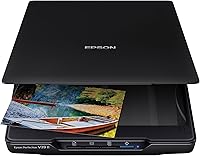
The Epson Perfection V850 Pro is a flatbed photo scanner. Its dual lens system selects from two lenses for the best result at each resolution, and the LED light source covers reflective and film scanning.
That makes it the flexible pick when your archive includes prints and slides together.
The Plustek OpticFilm 8200i SE is a dedicated 35mm film and slide scanner. It reads mounted slides and negative strips, with an integrated infrared channel for dust and scratch removal.
It suits a slide-only project where file quality is the priority.
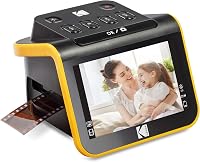
The Kodak Slide N Scan is a standalone converter. It shows each frame on a 5-inch LCD screen and saves straight to an SD card.
The easy-load inserts let you feed slides and negatives continuously instead of handling each frame. It's the fastest route from shoebox to digital files.
The trade-off is depth. A flatbed or dedicated film scanner gives you finer control over resolution and color.
A standalone unit wins on convenience, screen preview and card-based saving.
Decide the type by your archive: mixed prints and slides point to a flatbed, a pure 35mm slide project to a dedicated scanner, and a quick sharing job to a standalone unit.
Do you need Digital ICE or infrared dust removal?
Yes, if you want to skip hours of retouching. An infrared channel detects dust, scratches and surface defects on the film and fills them in as it scans.
For old slides that have sat in a box for decades, this saves real time.
The Plustek 8200i SE has a built-in infrared channel that detects dust and scratches on negatives and slides. It's designed for defect removal without retouching the images afterward.
The Epson V850 Pro carries Digital ICE for the same job on its film scans.
Infrared cleaning works best on color film. On black-and-white film the infrared signal can confuse the correction, so many users turn it off there.
The Kodak unit takes a different path: one-touch software enhances, resizes and converts photos without separate defect tools.
Time is the hidden cost. A 4000 dpi scan with ICE on a dedicated scanner can take several minutes per frame.
Multiply that by a few hundred slides and you see why defect removal belongs on your checklist only when the film is actually dirty or scratched.
Treat infrared cleaning as a time-saving feature for color slides, and plan to scan black-and-white frames without it. If your slides are clean and stored well, the feature matters less than resolution and holder fit.
What film holders and trays come in the box?
The holders decide whether a scanner handles mounted slides, strips or both, so read the included accessories before comparing prices. A missing holder can turn a bargain into a dead end.
The Plustek 8200i SE includes two film holders and two slide holders. That covers 35mm strips and mounted slides, and the holders hold the frame flat for a sharp scan.
The Epson V850 Pro includes film holders as well, and its flatbed lid accommodates film and slides across the glass.
The Kodak Slide N Scan takes a different approach. Its easy-load insert system lets you feed slides and negatives continuously, and the box includes a 50mm slide holder plus adapters for 135, 110 and 126 film.
A cleaning brush, USB cable and HDMI cable round out the kit.
Think about your physical media. Slides in thick plastic mounts need a holder that accepts the mount depth.
Loose strips need a strip holder that keeps the film flat and advances frame by frame. A mixed collection needs both.
Some buyers also scan the slide mount itself for the date stamp or handwritten label. A flatbed with a film holder lets you capture that border; a dedicated scanner's holder may crop tighter.
Match the included holders to your actual boxes of slides, and budget for an extra holder only when a model's kit misses a format you own.
How do flatbed and dedicated 35mm scanners compare in daily use?
A flatbed fits into a desk and handles multiple jobs, while a dedicated scanner sits as a single-purpose tool with a film-only workflow. The day-to-day difference is setup time and how you handle each frame.
A flatbed like the Epson V850 Pro works on a desk and scans prints, documents and film. Its 20.9 lb weight and 19.8 inch width make it a substantial piece of equipment.
The dual lens system and 6400 dpi handle film, and the same machine scans the family photo album on the glass.
The Plustek 8200i SE is smaller and film-focused. Its 1.8 kg body sits beside a computer and feeds one frame at a time through its holders.
The bundled SilverFast SE Plus software gives you control over color and exposure on each slide. It supports Windows 7 through 11 and Mac OS 10.7 through 14.x.
The Kodak Slide N Scan stands alone. Its 5-inch screen shows each frame before you save, and its gallery mode doubles as a small digital photo frame.
It supports SD or SDHC cards up to 32GB and connects to a computer over USB-C or HDMI.
Workflow shapes the choice more than specs. A flatbed lets you load several slides in a holder and walk away.
A dedicated scanner often means one frame at a time with more control per scan. A standalone unit means stack, preview, save, repeat.
Pick the workflow you'll actually keep up with, not the one with the best spec sheet. A scanner that's easy to set up gets used; a fussy one sits in a closet.
What software and computer setup do slide scanners need?
Plan for the software as part of the purchase. Most dedicated film scanners rely on a computer, while standalone units can run without one.
The Plustek bundles Plustek QuickScan and LaserSoft Imaging SilverFast SE Plus.
Drivers download from Plustek's website for Windows 7 through 11 and Mac OS 10.7 through 14.x.
The Epson V850 Pro lists support for Windows 8.1, 8, 7, Vista and XP, plus Mac OS X 10.6.x through 10.10.x. If your computer runs a newer operating system, that's worth checking against Epson's current driver page before you order.
The Kodak Slide N Scan connects over USB-C to a computer, or saves directly to an SD card. It requires an SD card to operate and the card isn't included, so buy one with the scanner.
Its touch-based software keeps settings simple: film type, brightness and date/time.
Color management matters more than most buyers expect. SilverFast gives you per-scan control that suits archival work.
Basic software suits quick sharing. Decide how much editing you want to do before you commit to a software stack.
Check your operating system against the model's driver support and budget for a card or cable the kit doesn't include. Software friction is the most common reason slide projects stall.
How should you plan a scanning workflow for a big slide collection?
Sort first, scan in batches, and keep a naming system from the first file. A plan turns a box of 800 slides into a few evenings of work instead of a months-long slog.
Start by culling. Group slides by year or event and set aside duplicates and blanks.
Scanning fewer frames well beats scanning everything badly. Preview each group on a light box or the scanner's screen before committing to a resolution setting.
Set one resolution and one color profile for the whole batch. The Kodak unit's one-touch button makes that easy for sharing copies.
A dedicated scanner like the Plustek rewards a consistent SilverFast preset across a carousel. The Epson's dual lens system picks the lens for your chosen resolution, so set it once and leave it.
Name files as you go. A date or event prefix plus a sequence number keeps a large collection findable later.
Back up to two places before you clear the originals from your desk.
Clean as you load. A brush or blower removes loose dust before the scan, and infrared cleaning handles the rest on color film.
The Kodak kit includes a cleaning brush for this step.
Batch by event and keep one preset per batch, then back up before moving to the next group. A steady rhythm gets the collection finished; a perfectionist loop per slide does not.
Which of these slide scanners fits your home project?
The Epson Perfection V850 Pro is the best pick for most homes with mixed prints and slides, the Plustek 8200i SE is the best for pure 35mm archive quality, and the Kodak Slide N Scan is the best for quick sharing without a computer.
Our score weighs specs, features and buyer feedback against what you're shopping for. The Epson earns a 9 for its dual lens system, 6400 dpi, 4.0 Dmax and film holders, which cover slides and prints in one machine.
The Kodak earns 8.8 for its 22MP sensor, 5-inch screen and easy-load inserts that make slide conversion fast and simple. The Plustek earns 8.1 for its 7200 dpi, 48-bit output and infrared dust removal aimed at 35mm film only.
Choose the Epson if you also have prints, documents or mixed formats and want one scanner on the desk. Choose the Plustek if 35mm slides are the whole job and you want the deepest file from each frame.
Choose the Kodak if speed and a screen matter more than depth and you'd rather not tether to a computer.
Before you buy, confirm the included holders match your slide mounts. Then compare the best 35 mm slide scanners against your volume: a few hundred slides suit a standalone unit, while a large archive rewards the flatbed or dedicated model.
If you want model-by-model comparisons, see our roundups of the best scanners for 35mm slides and the best slide and negative scanners. If your home desk also needs a paper scanner, read how to choose a document scanner and the guide to what is the best slide scanner to buy for a second opinion.
Pick the Epson for mixed media, the Plustek for pure film quality, and the Kodak for fast, screen-based sharing. That decision rule covers most home slide projects, and the right holders and workflow do the rest.
Frequently asked questions
How many dpi do I need to scan 35mm slides?
Aim for an optical 2400 to 4000 dpi for normal prints and sharing. Above 4000 dpi helps only if you plan large prints or heavy crops.
Interpolated numbers above the optical figure add no real detail.
Can a flatbed scanner handle mounted 35mm slides?
Yes, if it comes with a slide holder or a transparency unit. The Epson Perfection V850 Pro includes film holders and a dual lens system for film and slides.
Without that accessory, a plain flatbed only scans reflective paper.
What does Digital ICE do on a slide scanner?
An infrared channel detects dust and scratches on the film surface and fills them in during the scan. Plustek and Epson both build this into their film models.
It saves retouching time but adds scan time and works best on color film.
Is a cheap all-in-one film scanner good enough for family slides?
A 22MP standalone unit like the Kodak Slide N Scan suits quick sharing and viewing on its 5-inch screen. It gives you speed and simplicity rather than archive-grade depth.
Serious prints and long-term archiving point to a dedicated or flatbed model.
How long does it take to scan a box of slides?
Expect minutes per slide on a high-resolution dedicated scanner with ICE on. A standalone unit with continuous feed moves faster per slide because you load a stack rather than handling each frame.
Batch size and settings set the real pace.