Does the Canon LiDE 400 Scan Slides?
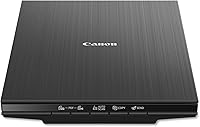
No, the Canon LiDE 400 does not scan slides by itself. It's a flatbed document and photo scanner with no built-in film lamp or slide holder, so 35mm slides need extra gear or a dedicated film scanner instead.
On this page (8 sections)
- Does the Canon LiDE 400 scan slides?
- How does the Canon LiDE 400 scan slides?
- Why doesn't the LiDE 400 scan slides out of the box?
- What do you need to scan slides instead?
- Which scanner should you buy for slides?
- Can you scan slides on another Canon flatbed?
- Is a flatbed ever the right choice for slides?
- How should you decide what to buy?
No, the Canon LiDE 400 does not scan slides by itself. It's a flatbed document and photo scanner with no built-in film lamp or slide holder, so 35mm slides need extra gear or a dedicated film scanner instead.
That's the short answer to "does the canon lide 400 scan slides." The longer version matters if you already own the LiDE 400 or you're deciding what to buy for a shoebox of old slides.
A flatbed without a transparency unit simply isn't built for see-through film.
Does the Canon LiDE 400 scan slides?
No. The Canon LiDE 400 is a flatbed scanner designed for reflective originals: photo prints, paper documents, receipts and flat artwork.
A slide is a transparent frame, so a flatbed without a transparency unit can't capture it.
The scanner's light sits under the glass and bounces off the item back to the sensor. A slide lets that light pass straight through, so a normal flatbed scan comes out blank or washed out.
You need a second light above the film to read the image.
That's why slide scanning is usually handled by a dedicated film scanner or a flatbed that includes a film adapter. The LiDE 400 does neither, which is the whole answer to whether the Canon LiDE 400 can scan slides.
The two jobs look similar on paper and share almost nothing under the glass.
How does the Canon LiDE 400 scan slides?
It doesn't, not without help. The workaround is a separate light panel placed over the slide and a holder that keeps the film flat and positioned.
This is the same principle a transparency unit uses, just assembled by hand.
Results are uneven. The extra light has to be bright and even, and the slide has to sit perfectly flat and square.
Any tilt shifts the colors and softens the detail. For a handful of slides it can be a fun experiment; for a family archive it's slow and frustrating.
If you want to try it, look for a small LED light pad and a 35mm slide holder that fits your flatbed's glass area. Then scan at high resolution and correct the color afterward.
It's more of a project than a product feature. Budget the same evening for one frame that a film scanner captures in seconds.
Why doesn't the LiDE 400 scan slides out of the box?
Because Canon builds it as a general-purpose flatbed. The LiDE 400 is aimed at home and office users who scan prints, documents and paperwork.
Film support isn't part of its design.
A film-capable flatbed adds a transparency unit in the lid: a light source that shines down through the film. That unit also needs a holder to keep slides flat and in the right spot.
The LiDE 400 has neither part. The scanner's light source sits below the glass for reflective originals, and there's nothing in the lid to light a frame from above.
The lesson for shoppers is simple. Check for "transparency unit" or "film adapter" in the specs before you buy a flatbed for slides.
"Photo scanner" alone doesn't mean film support. If you're weighing the slim Canon models against each other, our Canon LiDE 300 vs 400 comparison covers what each one actually handles.
What do you need to scan slides instead?
The cleanest answer is a dedicated film and slide scanner. These machines load a slide, light it from behind and save a digital file, often without a computer.
That's the best way to digitize slides for most households with a box of old frames. The light and the holder come built in, so there's no alignment guesswork.
A flatbed with a real transparency unit is the second route. It's slower and usually needs the film holder aligned by hand, but it also scans prints and documents.
Choose it if you have lots of paper photos alongside the slides.
A light pad and holder on your existing flatbed is the third option. It's the cheapest path and the least reliable.
It suits a curious tinkerer, not someone who wants a finished archive. For a big box of frames, the first route is the one that actually gets finished.
Which scanner should you buy for slides?
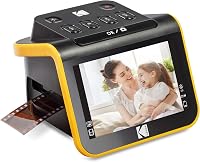
A dedicated slide scanner wins for anyone whose main job is turning 35mm slides into digital files. The Kodak Slide N Scan loads a slide, previews it on its screen and saves straight to a card.
Its 22MP sensor and 5 inch LCD let you check each frame before saving. The easy-load inserts take 135, 110 and 126 film as well as 50mm slides, so a mixed box of old film isn't a problem.
The continuous feed means you don't pull the tray out and reposition a slide each time. You'll need an SD card, which comes separately.
For a wider look at film-capable machines, see our roundup of the best slide and negative scanners.
The Kodak Scanza covers more film types, including Super 8 and 8mm, which the Slide N Scan doesn't list. Its 14MP sensor interpolates up to 22MP.
It's a camera-based scanner, so it's quick rather than archival. Note that Super 8 frames convert to still images, not video.
The 3.5 inch screen tilts and adjusts for brightness, which helps when you're checking a long strip in a bright room.
The Epson Perfection V39 II is the pick if slides are only part of the job. It's a flatbed for prints and documents at 4800 dpi optical resolution, with one-touch scanning and photo restoration.
Its high-rise removable lid lets you lay books and albums on the glass. It doesn't include a film adapter, so it won't scan slides on its own either.
It's the better fit for paper photos and paperwork.
How do the three slide options compare?
The Kodak Slide N Scan is the easiest dedicated route for a slide box. The Kodak Scanza adds more film formats for a similar one-button workflow.
The Epson V39 II is the flatbed to buy when prints and documents matter more than film.
Our score weighs specs, features and buyer feedback against what you're shopping for. It's a guide to fit, not a lab measurement.
Each machine earns its place for a different reader.
Can you scan slides on another Canon flatbed?
Some Canon flatbeds do support film, but you have to check the model. Canon's film-capable models ship with a transparency unit and a slide or film holder.
The LiDE 400 isn't one of them.
Look for "Film" in the scanner type, or a stated film adapter in the box. If the spec sheet only lists photo and document scanning, it's a reflective-only machine.
That's the trap the LiDE 400 falls into for slide owners.
If you already own a LiDE 400 and a pile of slides, don't buy a second flatbed on a guess. A dedicated film scanner is usually cheaper than a film-capable flatbed and far simpler for slides.
Keep the LiDE 400 for prints and paper, which is what it does well.
Is a flatbed ever the right choice for slides?
Only when it has a transparency unit. A flatbed with a film adapter scans slides and also handles prints, documents and albums.
That makes it the better buy for a household with mixed media.
Speed and convenience still favor the dedicated scanner. Loading a slide into a holder and capturing it takes seconds on a film scanner.
A flatbed film setup takes longer and needs more care with alignment. On a long session the gap widens, because each flatbed frame gets its own load and position step.
Think about volume. A few dozen slides can justify a flatbed with a film adapter.
Hundreds of slides, or a mix of negatives and slides, are better served by a dedicated machine built for that job. For 35mm specifically, our guide to the best scanner for 35mm slides narrows the field.
How should you decide what to buy?
Start with what's in the box. If it's mostly slides and negatives, buy a dedicated film scanner.
If it's mostly prints with some slides mixed in, buy a flatbed that includes a film adapter. If you already own the LiDE 400, keep it for paper and add a film scanner for the slides.
The Canon LiDE 400 doesn't scan slides, and no setting changes that. For slides alone, the Kodak Slide N Scan is the straightforward pick.
For more film formats, the Kodak Scanza covers Super 8 and 8mm too. For prints and documents first, the Epson Perfection V39 II is the flatbed to choose.
That's the full answer to whether the canon lide 400 scan slides: it doesn't, and the fix is either extra film gear or a scanner built for the job. Pick the machine that matches your pile, not the one with the best-sounding box.
Frequently asked questions
Can you scan slides on any flatbed scanner?
Only flatbeds with a transparency unit and slide holder can scan slides directly. A standard flatbed like the LiDE 400 scans reflective items such as prints and paper, and slides are transparent, so the light passes straight through.
What should I buy instead to scan 35mm slides?
A dedicated film and slide scanner is the simplest route. The Kodak Slide N Scan handles 50mm slides and several negative formats, saves straight to an SD card, and shows each frame on a 5 inch screen before you capture it.
Can I use the LiDE 400 for photo prints and documents?
Yes. The LiDE 400 is built for prints, documents and flat artwork, and it's a light, slim unit.
If your goal is a mix of paper and slides, add a film scanner so one machine handles paper and the other handles film.
Is a dedicated slide scanner better than a flatbed for slides?
For slides alone, a dedicated scanner is easier and faster. The Kodak Slide N Scan loads a slide, shows it on its screen and saves a file with one button press.
A flatbed only matches that when it includes a proper film adapter.