ScanSnap iX1300 vs iX2400: Which Desk Scanner Fits? (October 2026)
Choose the iX1300 for a smaller desk and Wi-Fi; choose the iX2400 for a 100-sheet feeder and faster batch scanning. This ScanSnap iX1300 vs iX2400 comparison comes down to space, connection needs and how much paper you scan at once.
On this page (7 sections)
- ScanSnap iX1300 vs iX2400: which fits your desk?
- Which scanner is better for frequent paper batches?
- Do you need Wi-Fi or is USB enough?
- How do the iX1300 and iX2400 handle different documents?
- Which ScanSnap is easier to set up?
- Should you choose the iX1300, iX2400 or iX2500?
- Verdict: which desk scanner fits?
Choose the iX1300 for a smaller desk and Wi-Fi; choose the iX2400 for faster batches and a larger feeder. In this ScanSnap iX1300 vs iX2400 comparison, your daily paper volume and connection preference matter more than the shared ScanSnap name.
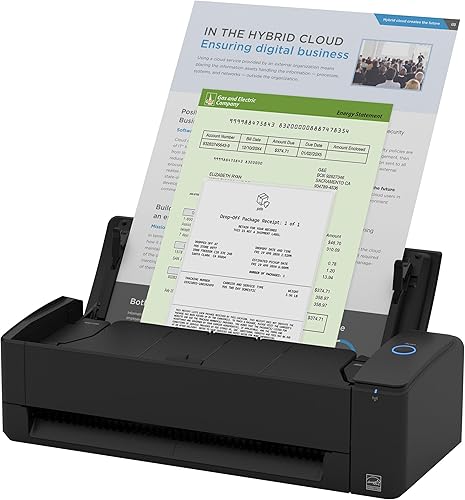
The iX1300 measures 4.5 x 11.7 x 3.3 inches and holds 20 sheets. The iX2400 measures 6.26 x 11.5 x 6.34 inches and holds 100 sheets, so it takes more height and offers five times the feeder capacity.
Both scan double-sided documents and include automatic image cleanup. If neither one matches your work style, the iX2500 combines a 100-sheet feeder with Wi-Fi and USB.

ScanSnap iX1300 vs iX2400: which fits your desk?
The iX1300 is shorter and narrower in depth, while the iX2400 is taller and offers more feeder capacity. Measure the space where the scanner will sit, including room to load paper and remove completed pages.
The iX1300's footprint is about 0.38 square feet, based on its width and depth. The iX2400's is about 0.50 square feet; these figures cover the scanner body only and don't include working clearance.
Height matters too. The iX1300 is 3.3 inches tall, compared with 6.34 inches for the iX2400, so check any shelf above the device and whether the paper path will stay clear.
How the iX1300 suits a small desk
The iX1300 fits better when you want a scanner that can stay out of the way between jobs. ScanSnap describes its design as space-saving, and its dimensions are smaller than the iX2400 in depth and height.
Its 20-sheet capacity is enough for short runs of bills, forms, receipts or family paperwork. You can also use Wi-Fi or USB, and ScanSnap says it can scan without a computer.
How the iX2400 suits a paper station
The iX2400 is a better fit when you can leave a taller scanner in place and regularly load larger stacks. Its 100-sheet feeder means fewer pauses to reload for a batch.
Its USB connection keeps the setup wired. That can work well beside a desktop computer, but it limits placement compared with the iX1300's Wi-Fi option.
Which scanner is better for frequent paper batches?
The iX2400 is the stronger pick for repeated large batches because it holds 100 sheets and reaches up to 45 pages per minute. The iX1300 reaches up to 30 ppm duplex and has a 20-sheet capacity.
These are maximum speeds, not a promise that every job will finish at that rate. Paper condition, document length and computer setup can affect the time you spend scanning and organizing.
The iX2400 also detects document size and color depth, removes streaks and blank pages, and straightens and rotates pages automatically. The iX1300 includes automatic de-skew, color optimization and blank-page removal.
When the iX1300 is enough
Choose the iX1300 if you scan a few pages at a time and don't need a large feeder waiting on your desk. It handles documents, photos, cards and other paper types, including thick items and plastic cards.
The iX1300 may also suit a shared workspace where people want to send scans to different devices. Wi-Fi, USB and mobile scanning give you more placement options than the iX2400's wired connection.
When the iX2400 saves more loading
Choose the iX2400 if you often face a thick stack of receipts, forms or business papers. The 100-sheet feeder can reduce reload breaks, while one-touch scanning and automatic cleanup help keep routine jobs simple.
The scanner also handles business cards, receipts, photos and envelopes. If your work is mostly occasional paperwork, that added capacity may sit unused, so consider your usual batch size before choosing it.
Do you need Wi-Fi or is USB enough?
The iX1300 is the clear choice if you need Wi-Fi; the iX2400 is USB only. Think about where the scanner will sit and which devices need access to the scans.
The iX1300 can send scans to Mac, PC, mobile devices and cloud services. It also supports Chromebook scanning through the mobile app.
The iX2400's USB connection can be a straightforward fit for a fixed desk setup with a nearby compatible computer. If you need a wireless connection and a 100-sheet feeder, compare the ScanSnap iX2500 as another option in the range.
For a broader look at device placement, see our guide to wireless scanners for a home office. It can help you decide whether wireless access is useful enough to prioritize.
How do the iX1300 and iX2400 handle different documents?
Both models can scan more than standard sheets, including receipts, cards and photos. The iX1300 specifically calls out thick items and plastic cards, while the iX2400 lists envelopes as another supported type.
Both include ScanSnap Home software for managing and editing scans. You can use it to organize documents, receipts, business cards and photos.
A sheet-fed scanner is designed around loose media. For fragile prints, albums or film negatives, a flatbed or dedicated film scanner may suit the task better; browse the scanner categories to compare scanner types.
Which ScanSnap is easier to set up?
The iX1300 offers more connection choices, while the iX2400 keeps the connection to USB. Both are one-touch scanners with automatic cleanup features, so the bigger setup difference is how you connect them.
The iX1300 supports Windows, macOS, iOS, iPadOS, Android and ChromeOS through the stated system requirements. The iX2400 supports Windows and macOS, so check compatibility with your computer before choosing it.
For help choosing around your device, workflow and paper types, read how to choose a document scanner for your home desk. It covers the practical questions to settle before buying.
Should you choose the iX1300, iX2400 or iX2500?
Pick the iX1300 for compact placement and Wi-Fi, the iX2400 for larger wired batches, or the iX2500 for wireless scanning with a 100-sheet feeder. Your choice should follow the papers you scan most and the connection you need.
The iX2500 matches the iX2400's stated maximum speed and feeder capacity, then adds Wi-Fi, USB and a touchscreen. Its body is the same listed width and depth as the iX2400, so it still needs more height and desk space than the iX1300.
For an overview of scanner types and typical home uses, start with our plain guide to scanners for home use. If you already know a duplex document scanner is right for you, our duplex scanner guide explains when two-sided scanning helps.
Verdict: which desk scanner fits?
Choose the iX1300 if you value a smaller body and wireless placement; choose the iX2400 if you scan bigger stacks over USB. If you need both wireless access and a 100-sheet feeder, consider the iX2500.
The iX1300 is the more flexible fit for a compact desk and mixed device use. The iX2400 is built around higher batch capacity and faster stated scanning, with a wired setup that works best when the scanner can stay by a computer.
Our score weighs specs, features and buyer feedback against what you're shopping for.
Frequently asked questions
Is the ScanSnap iX1300 or iX2400 faster?
The iX2400 has the higher stated speed, up to 45 pages per minute, compared with up to 30 ppm duplex for the iX1300. Both include automatic image cleanup features, but the speed figures describe maximum rates and don't guarantee the same result for every paper type or setup.
Does the ScanSnap iX2400 have Wi-Fi?
No, the iX2400 connects by USB. The iX1300 supports USB and Wi-Fi, so it is the more flexible choice if you want to scan to mobile devices, computers or cloud services over a wireless connection.
Which ScanSnap scanner has the larger feeder?
The iX2400 has a 100-sheet feeder, while the iX1300 has a 20-sheet capacity. That makes the iX2400 more suited to larger batches, though you should still consider your desk space and whether a wired connection meets your needs.
Can the ScanSnap iX1300 scan without a computer?
Yes. The iX1300 can be used without a computer and supports Wi-Fi, mobile devices and cloud services.
The iX2400 uses USB, so plan to connect it to a compatible Windows PC or Mac for your workflow.



