ScanSnap iX1300 Review: Compact Duplex Paper Scanner (October 2026)
The ScanSnap iX1300 suits a small desk and regular two-sided paper scanning, with USB or Wi-Fi connections and scans to computers, phones and cloud services. Choose the Canon R10 if you want a USB-only portable scanner, or compare the Epson ES-C220 for batch document work.
On this page (8 sections)
The ScanSnap iX1300 is a compact duplex scanner for home desks, with USB and Wi-Fi connections and a stated maximum speed of 30 pages per minute. It suits regular document, receipt and card scanning, especially if you want to send files to a computer, phone or cloud service.
Its 20-sheet capacity is better for short batches than a tall stack of paperwork. The Canon imageFORMULA R10 is a slimmer USB option, while the Epson WorkForce ES-C220 also offers a 20-page feeder and duplex scanning.
The ScanSnap iX1300 review at a glance
The iX1300 stands out for combining small dimensions, two-sided scanning and flexible connections. Its stated size is 4.5 in deep, 11.7 in wide and 3.3 in high, so measure your available desk space and leave room to feed paper.
ScanSnap iX1300: Best for a connected home desk
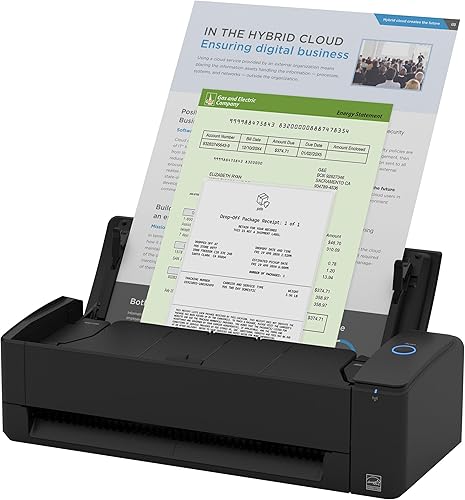
- Up to 30 ppm duplex scanning
- USB or Wi-Fi
- 20-sheet capacity
- 4.5 x 11.7 x 3.3 in
A compact document scanner for people who want flexible connections, one-touch scanning and software for organizing receipts, business cards, photos and documents.
Pros
- USB and Wi-Fi connections
- Scans to computers, mobile devices and cloud services
- Handles documents, photos, cards and thick items
- Automatic de-skew and blank-page removal
Cons
- The 20-sheet capacity suits batches rather than large stacks
- Wi-Fi and mobile workflows depend on your device and setup
The single-touch workflow and ScanSnap Home software are aimed at people who want scans organized alongside other documents. Automatic de-skew, color optimization and blank-page removal are included in the scanning workflow.
Who should choose the ScanSnap iX1300?
Choose it if you regularly scan mixed paper items and value Wi-Fi as well as USB. It handles documents, receipts, business cards, photos, thick items and plastic cards.
Consider another type of scanner if your main goal is detailed archiving of fragile photo prints or film. Our guide to choosing a document scanner can help you compare feeder, connection and file workflow needs before you buy.
What do the size and feeder mean in daily use?
The iX1300's compact footprint can help keep a home desk usable, and its 20-sheet capacity supports short batches. That combination fits recurring paperwork better than occasional high-volume scanning.
Think about what you scan in one sitting. A few receipts, forms or business cards are easy to divide into manageable runs, but a large filing backlog may call for a scanner with a larger feeder.
Its listed dimensions describe the scanner body, not the space needed for paper handling. Check the manual's placement guidance and keep nearby objects clear of the feed path.
If desk space is tight, compare the iX1300 with a portable model such as the Canon imageFORMULA R10. If you scan more paper per session, the Epson WorkForce ES-C220 also has a 20-page feeder.
How fast is duplex scanning?
The iX1300 scans both sides of a sheet and has a stated maximum speed of up to 30 pages per minute. Duplex scanning can save steps when you regularly handle forms or records printed on both sides.
Treat the speed as a maximum rather than a promise for every job. Paper size, color settings, image adjustments and the destination you choose can affect the full time from loading a stack to saving usable files.
The scanner includes automatic de-skew and blank-page removal, which can reduce cleanup for common document batches. Check the scan output before discarding paper originals, especially when the documents matter for taxes, contracts or records.
For home paperwork, resolution choices can affect file size and readability. See our guide to document scan resolution for a simple starting point.
Which connections and devices does it support?
The iX1300 connects by USB or Wi-Fi and can send scans to Mac and PC computers, mobile devices and cloud services. It can also scan to Chromebook through the mobile app.
That range gives you options for a shared home setup, but the best route depends on where you file and search for documents. Choose a destination you can use consistently, then test the workflow with a noncritical page before scanning a backlog.
System requirements include Windows 10 or 11, macOS Monterey 12 or later, iOS 16 or later, iPadOS 16 or later, Android 10 or later and ChromeOS 138.0.7204.178 or later. Confirm your operating system before buying, especially if you use an older computer or tablet.
What does ScanSnap Home add?
ScanSnap Home brings scanning and file organization tools together for documents, receipts, business cards, photos and other scans. The iX1300 also includes a Quick Menu that can send a scan to a chosen computer app.
A simple filing plan makes those tools more useful. Pick a consistent folder structure and file names before scanning, such as year and document type, so important records are easier to find later.
Receipts can benefit from a separate folder or naming rule because they often need to be retrieved by merchant or date. Our guide to the best scanners for receipts covers options for people who scan expense records often.
ScanSnap iX1300 alternatives
The iX1300 is the most flexible of these three for connection options, while the Canon and Epson models give you different trade-offs. Match the alternative to the way you scan and where you need files to go.
Canon imageFORMULA R10 alternative
The Canon R10 is a USB-powered portable scanner with a 20-sheet automatic feeder and duplex scanning up to 12 pages per minute. Its built-in software needs no installation, and Canon says the model is not intended for scanning photographs on photo paper or photographic media.
Canon imageFORMULA R10: Best for USB-only portability

- Up to 12 ppm duplex scanning
- USB powered
- 20-sheet feeder
- 3.74 x 11.22 x 1.57 in
A slim portable option with built-in software and a 20-sheet feeder. Canon says it is not intended for photo paper or photographic media.
Pros
- Small, lightweight design
- USB connection and power
- Built-in software requires no installation
- Handles receipts, business cards and plastic cards
Cons
- No Wi-Fi connection
- Not intended for photographs on photo paper
Choose it for documents, receipts and cards when a slim USB workflow is enough. For a closer comparison with another portable option, see our Brother DS-640 review.
Epson WorkForce ES-C220 alternative
The Epson ES-C220 scans both sides in one pass at up to 30 pages per minute and includes a 20-page automatic feeder. Its USB connection keeps the setup simple, while Epson ScanSmart supports previewing, emailing and uploading files.
Epson WorkForce ES-C220: Best for compact paper batches

- Up to 30 ppm duplex scanning
- 20-page feeder
- USB connection
- Scans paper, cards and passports
A small USB document scanner with a 20-page feeder and image adjustments for paper batches. Epson ScanSmart supports previewing, emailing and uploading scans.
Pros
- Two-sided scanning in one pass
- 20-page automatic feeder
- Scans paper, cards and passports
- Automatic cropping and skew correction
Cons
- USB connection only
- Resolution is listed as 300 dpi
It also scans cards and passports, and its image adjustments include automatic cropping, blank-page deletion and skew correction. Choose it if a USB document workflow and batch feeding fit your routine.
What should you check before buying?
Check your device compatibility, connection preference and usual batch size before choosing the iX1300. These three points determine whether its convenience features match your setup.
Measure the desk area and consider where paper will enter and exit. Then confirm that your computer or mobile device meets the system requirements and that your preferred destination works with your file storage routine.
If you mainly scan one-sided pages now and then, a simpler portable scanner may be enough. If you scan two-sided records or share scanning across devices, the iX1300's Wi-Fi and duplex features may justify choosing it over a USB-only model.
For a head-to-head decision against another ScanSnap model, read ScanSnap iX1300 vs iX2400. For general home use, our best duplex scanners for home use guide compares choices by scanning needs.
Is the ScanSnap iX1300 worth choosing?
Choose the ScanSnap iX1300 if you want compact duplex scanning with both USB and Wi-Fi and expect to scan short batches of varied paper. Pick the Canon R10 for a slim, USB-powered setup, or the Epson ES-C220 for a USB feeder workflow with image adjustments.
Before deciding, confirm device support and think through where scanned files will go. If receipts are your main use, compare the best scanners for receipts; if you want to weigh the two ScanSnap models, use the iX1300 vs iX2400 comparison.
Our score weighs specs, features and buyer feedback against what you're shopping for.
Frequently asked questions
Is the ScanSnap iX1300 good for home use?
The iX1300 fits home use if you scan documents, receipts, cards or occasional photos and want USB or Wi-Fi connections. Its 20-sheet capacity works for modest batches, while its compact body can help on a small desk.
For larger daily stacks, compare feeder needs before choosing.
Does the ScanSnap iX1300 scan both sides at once?
Yes, the iX1300 supports duplex scanning at up to 30 pages per minute. The speed is a maximum, so actual scanning time can depend on document size, settings and where you send the files.
Can the ScanSnap iX1300 scan without a computer?
Yes, it can be used without a computer and connects through Wi-Fi or USB. ScanSnap says it can send scans to mobile devices and cloud services, and Chromebook scanning uses the mobile app.
Check that your device and software meet the stated system requirements.
Can the ScanSnap iX1300 scan photographs?
The iX1300 handles photos as well as documents and cards, but it is a document scanner rather than a flatbed dedicated to photo work. For fragile prints or careful photo archiving, compare the options in our home scanner guide before deciding.


