8 Best Scanners for Receipts, Bills and Tax Papers (October 2026)
The best scanners for receipts and bills include the ScanSnap iX1300 for a shared home office, the Epson WorkForce ES-50 for a light travel kit, and the Canon imageFORMULA R10 for mobile duplex batches.
On this page (4 sections)
The best scanner for receipts for most home offices is the ScanSnap iX1300, which scans both sides and connects by Wi-Fi or USB. The Epson ES-50 is a better fit for a light travel kit, while the Epson ES-C220 is suited to batches on a small desk.
A receipt scanner should match your weekly paper load. A single-sheet mobile model can handle a few receipts as they arrive; a feeder is more convenient when bills, tax papers and statements pile up together.
For a broader overview of scanner types, start with our plain guide to choosing a document scanner. If two-sided forms are common for you, compare the options in our best duplex scanners for home use.
Our picks at a glance
-
1
-
2

-
3

Which receipt scanners fit different workloads?
The best scanner for receipts depends on whether you prioritize batch feeding, portability, wireless filing or a compact desk setup. These picks are ordered by score, with each model matched to a distinct use.
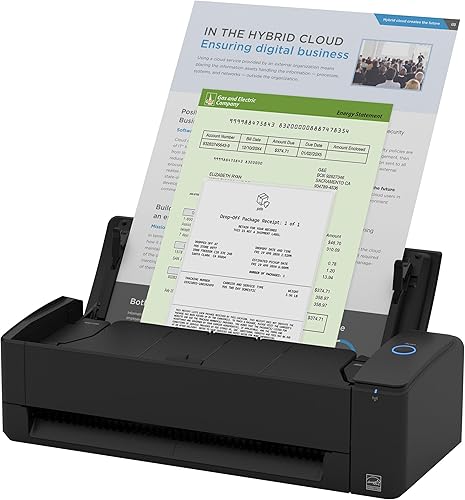
ScanSnap iX1300: Best for a shared home office
- Duplex scanning up to 30 ppm
- USB or Wi-Fi
- 20-sheet capacity
- Scans receipts, documents, photos and cards
A compact desk scanner with duplex scanning and Wi-Fi or USB connections. ScanSnap Home can organize receipts alongside documents, business cards and photos.
Pros
- Scans both sides in one pass
- Works with computers and mobile devices
- Can scan without a computer
Cons
- Needs desk space and a computer or mobile device for many workflows
- 20-sheet capacity may not suit large batches
The ScanSnap iX1300 is the strongest all-around choice for a home office that scans receipts along with bills, cards and other papers. Its duplex scanning captures both sides, and the 20-sheet capacity can handle a small batch without feeding each page separately.
You can connect it over USB or Wi-Fi and send scans to a Mac, PC, mobile device or cloud service. ScanSnap Home brings receipts and other scanned material into one place for organizing and editing.
The compact design helps when desk space is limited, and it can scan without a computer. ScanSnap says a single touch starts scanning at up to 30 pages per minute, with automatic skew correction, color optimization and blank-page removal.
Choose this model if you want one device for receipts and mixed paper tasks. If your work is mainly a few pages at a time away from a desk, a mobile single-sheet scanner may take up less room.
Epson WorkForce ES-50: Best for a light travel kit
- Single-sheet scanning
- USB powered
- Scans receipts and ID cards
- OCR creates searchable PDFs and editable files
A light, single-sheet scanner for receipts and ID cards when portability matters. Its software can combine pages into one file and create searchable PDFs.
Pros
- Weighs 9.44 oz
- No separate power supply needed
- Handles pages up to 8.5 x 72 in
Cons
- Feeds one sheet at a time
- Connects by USB
The Epson WorkForce ES-50 suits a travel bag or a desk where only a few sheets need scanning at once. It weighs 9.44 oz, runs from its USB connection and scans a single page in as little as 5.5 seconds at 300 dpi, according to Epson.
It can handle receipts, ID cards and pages up to 8.5 x 72 in. Epson ScanSmart can combine pages into one file, and the included OCR can create searchable PDFs or editable Word and Excel files.
The tradeoff is its one-sheet feed. You insert each receipt yourself, so it fits a small workload better than tax-season stacks.
Choose it when light weight and simple USB power matter most. For a similar compact scanner that supports duplex scanning, consider the Canon R10 below.
Canon imageFORMULA R10: Best for mobile duplex batches
- Duplex scanning up to 12 ppm
- 20-sheet automatic feeder
- USB powered
- Built-in software
A portable scanner with a 20-sheet feeder for two-sided receipts and other office papers. Its built-in software can save searchable PDFs and lets you adjust scans.
Pros
- Scans both sides at once
- Handles receipts, cards and legal documents
- Works with Windows and Mac
Cons
- USB connection only
- Not intended for photographs on photo paper
The Canon imageFORMULA R10 is a portable option for small batches of receipts and forms. It has a 20-sheet automatic feeder and scans both sides at once at up to 12 pages per minute.
The R10 connects by USB and is compatible with Windows and Mac. Its built-in software can save searchable PDFs, preview scans, straighten and trim files, and set custom scan destinations.
Canon says it handles receipts, business cards, plastic or embossed cards, reports and legal documents. Canon also states that it is not intended for photographs on photo paper, so choose another scanner if photo prints are part of the job.
This is a useful middle ground if you want an automatic feeder without a fixed desk setup. For a slim single-sheet option, the Brother DS-640 is easier to carry.
Brother DS-640: Best for compact single-sheet scanning

- Scans up to 16 ppm
- USB powered
- Handles receipts and plastic cards
- Software includes OCR
A compact, USB-powered scanner for receipts and cards when you want a small device for a desk or bag. Brother's software supports OCR and several scan destinations.
Pros
- Works with Windows, Mac and Linux
- Image tools include background removal and text enhancement
- Scans documents up to 72 in long
Cons
- Feeds one sheet at a time
- No Wi-Fi connection
The Brother DS-640 is a compact scanner for receipts and ID cards when you need a simple device that can travel with a laptop. It draws power over USB and scans one page at a time at up to 16 pages per minute.
Brother's software supports Windows, Mac and Linux, with OCR and scan destinations that include a computer, network, cloud services or email. Image tools include color adjustment, rotation on PC, background removal and text enhancement.
Because it feeds one sheet at a time, it is a better match for receipts scanned as you receive them than for a thick tax-paper batch. Its length is under 1 ft, according to Brother's product details.
Choose the DS-640 if portability and broad computer support are key. If you want a feeder for stacks on a desk, the ES-C220 is a closer fit.
Epson WorkForce ES-C220: Best for small desk batches

- 20-page automatic feeder
- Duplex scanning up to 30 ppm
- USB connection
- Scans varied paper sizes and cards
A compact desk scanner for batches of receipts and papers. Its automatic feeder and two-sided scanning can reduce the need to feed each page by hand.
Pros
- Scans both sides in one pass
- Automatic cropping and skew correction
- Scans cards and passports
Cons
- USB connection only
- 20-page feeder limits batch size
The Epson WorkForce ES-C220 is made for small work areas where receipts arrive in batches. Its 20-page automatic feeder and single-step duplex scanning can capture both sides at up to 30 pages per minute.
Epson ScanSmart lets you preview, email and upload scans. The software can suggest file names and includes OCR, while image tools can crop, remove blank pages and correct skew.
The ES-C220 connects over USB and scans several document types, including cards and passports. Its 20-page capacity is useful for routine paperwork, though a larger office may want to divide bigger piles into batches.
Choose it if you want a compact desk scanner with automatic feeding and duplex capture. If you need wireless connections or a battery option, compare the mobile models below.
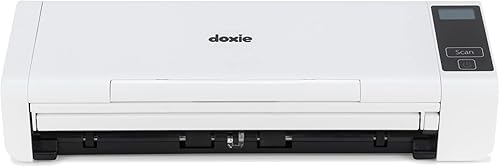
Doxie Pro: Best for mixed paper types
- Automatic duplex scanning
- 20-page collapsible feeder
- Direct feed slot for thick or delicate paper
- OCR creates searchable PDFs
A wired scanner with an automatic feeder for regular batches and a direct-feed slot for thick or delicate paper. Its software supports text recognition and scan organization.
Pros
- Handles receipts, cards, photos and documents
- Automatic cropping and rotation
- Software works with Mac and PC
Cons
- Wired USB connection
- Larger than the single-sheet travel models
The Doxie Pro suits mixed paper piles that include receipts, cards and thicker or delicate sheets. It combines a 20-page collapsible feeder with a direct-feed slot for material you would rather not send through the feeder.
It scans two-sided paper and can reach up to 22 pages per minute, according to Doxie. Its software supports text recognition, automatic cropping, rotation and contrast adjustment, then helps organize and send scans to services such as Dropbox, Evernote, OneNote and iCloud.
This model uses a wired USB connection and measures about 12 in wide. Its direct-feed option gives it more flexibility for mixed materials than the slim single-sheet scanners, but it takes more desk space.
Choose it if your paperwork varies in thickness and you want duplex scanning. For a wireless mobile workflow, the ScanSnap iX100 or Epson RR-70W is a closer match.
ScanSnap iX100: Best for wireless scanning on the move

- Wi-Fi or USB
- Battery powered
- Scans receipts, cards and paper
- Can scan two small items at once
A battery-powered mobile scanner for receipts when you need Wi-Fi and flexible placement. It scans one side at a time and can scan two small items together.
Pros
- Works with computers and mobile devices
- Can connect directly to a device or Wi-Fi network
- Cloud software can sort document types
Cons
- Does not scan both sides in one pass
- Single-sheet scanning suits smaller jobs
The ScanSnap iX100 is the wireless mobile option for scanning receipts away from a fixed desk. Its battery can scan up to 260 documents on a charge, and it connects by Wi-Fi or USB.
It scans one side at a time, but can scan two small items at once. ScanSnap Cloud can recognize document types, name files and send different types to different cloud services.
The iX100 handles paper, receipts and plastic cards, so it can serve as a light companion for business travel or remote work. Its simplex feed means two-sided receipts need to be turned over and scanned separately.
Choose it if battery power and wireless use matter more than automatic duplex. For wireless scanning with receipt-focused file naming, the Epson RR-70W offers another approach.
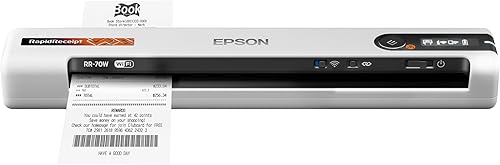
Epson RapidReceipt RR-70W: Best for wireless receipt filing
- Wi-Fi connection
- Scans up to 15 ppm in Automatic Feeding Mode
- Handles receipts, invoices and cards
- Automatic file naming
A lightweight wireless scanner with software that can identify receipts and invoices for file naming. It suits mobile work where Wi-Fi and cloud destinations are useful.
Pros
- Connects to cloud services through the mobile app
- Handles pages up to 8.5 x 72 in
- Can create searchable PDFs
Cons
- Wireless connection may not suit USB-only workflows
- Automatic Feeding Mode is needed for the stated speed
The Epson RapidReceipt RR-70W is aimed at people who want to file receipts and invoices wirelessly. It weighs 10.56 oz, connects over Wi-Fi and supports USB or battery power options.
Epson says its Smart Panel app can send scans to cloud services, including OneDrive, Dropbox and Google Drive. Its software can recognize receipt or invoice types for automatic file naming, and it supports searchable PDFs.
The RR-70W scans at up to 15 pages per minute in Automatic Feeding Mode and handles pages up to 8.5 x 72 in. Its wireless setup and software features suit mobile filing, but check that its connection and app workflow fit your devices.
Choose it if wireless receipt filing is a priority. If you prefer a known USB connection and a single-sheet travel scanner, the ES-50 is simpler.
What should you compare before choosing a receipt scanner?
Compare the feeder, duplex support, connection and file workflow before choosing a receipt scanner. The right mix depends on how many pages you scan and where you want the files to go.
How many receipts do you scan at a time?
A single-sheet scanner is fine for occasional receipts, but it makes you feed every page by hand. Models such as the ScanSnap iX1300, Canon R10, ES-C220 and Doxie Pro have 20-sheet feeders for small batches.
A feeder's capacity is not a promise that every receipt will feed well. Keep bent, torn or unusually small slips separate and follow the scanner's instructions for feeding them.
Do you need duplex scanning?
Duplex scanning captures both sides of each sheet in one pass. This can save steps when receipts or forms have notes or print on the back, while simplex scanning is enough for one-sided paper.
For more detail on the difference, read what a duplex scanner does. Choose based on the papers you actually keep, rather than paying for a feature you rarely use.
Which connection works for your workspace?
USB scanners suit a desk where the computer is nearby. Wi-Fi adds flexibility for a shared office or mobile device, while battery-powered models are useful when you scan away from a power outlet.
The iX1300 and iX100 offer USB and Wi-Fi. The RR-70W connects over Wi-Fi, while the ES-50, R10, DS-640, ES-C220 and Doxie Pro use USB.
Will OCR and file naming help?
OCR can make text in scanned files searchable, which helps when you need to find a vendor, date or amount later. Some scanner software can also create editable files or suggest names based on document type.
Think about where your files end up. A scanner is easier to use consistently when its software can save to the folders, cloud services or accounting workflow you already use.
How did we choose these receipt scanners?
We compared the supplied product features and specifications against common receipt-scanning needs: feeding small batches, capturing both sides, portability, connection options and file handling. The scores reflect that fit for the searcher's likely use.
No scanner here is right for every paper pile. A mobile single-sheet model can be convenient for a few receipts, while a feeder is more practical when you scan bills and tax papers in groups.
Which receipt scanner should you choose?
Choose the ScanSnap iX1300 if you want one compact desk scanner for receipts, bills and other documents, with both duplex capture and Wi-Fi. Choose the ES-50 for a very light USB scanner, or the ES-C220 for recurring batches.
If you are still deciding between a flatbed and a feeder, our guide to the best scanners for home use explains the main scanner types. For a wireless office setup, compare the models in our wireless scanner guide.
Our top 3 picks at a glance
-
1
-
2
-
3
Frequently asked questions
What kind of scanner is best for receipts?
A sheet-fed scanner is a practical choice if you have many receipts because you can feed pages without placing each one on a flatbed. Choose a duplex model if you scan two-sided receipts or forms, and a single-sheet mobile model if portability matters more than batch size.
Check how the scanner connects and where its software can save files.
Do I need a duplex scanner for receipts?
A duplex scanner captures both sides of a sheet in one pass. It can help when receipts or supporting papers have useful print on the back.
For receipts printed on one side, simplex scanning may be enough.
See our guide to what a duplex scanner is for the difference.
Can receipt scanners create searchable files?
Some scanners include OCR, which can make scanned text searchable in a PDF or editable in another file type. The Epson ES-50 includes OCR for searchable PDFs and editable Word and Excel files, while Brother DS-640 software includes OCR.
Check which file types and software work with your computer before choosing.
Should I use a receipt scanner or a phone?
A phone can work for occasional receipts, while a scanner may be easier for recurring batches or two-sided pages. A feeder can reduce repeated placement, and some scanners include OCR or file naming features.
Choose based on how many papers you handle and where you need to save them.


