8 Best Wireless Scanners for a Home Office (October 2026)
The best wireless scanners for a home office include the Epson FastFoto FF-680W for photo and paper batches, the ScanSnap iX2500 for frequent office paperwork, and the ScanSnap iX1300 for a small shared desk.
On this page (4 sections)
The best wireless scanner for a home office is the ScanSnap iX2500 for frequent paperwork, with Wi-Fi, USB-C, a 100-sheet feeder and scanning up to 45 pages per minute double-sided. For a smaller desk, choose the ScanSnap iX1300; for photo batches as well as documents, consider the Epson FastFoto FF-680W.
A home office scanner should match the papers you scan most. A few receipts each week call for different features than signed forms, tax records or thick stacks of double-sided pages.
This roundup covers desk scanners, a compact feeder model and two portable options. For a broader overview of scanner types, start with our plain guide to the best scanner for home use.
Our picks at a glance
-
1

-
2

-
3
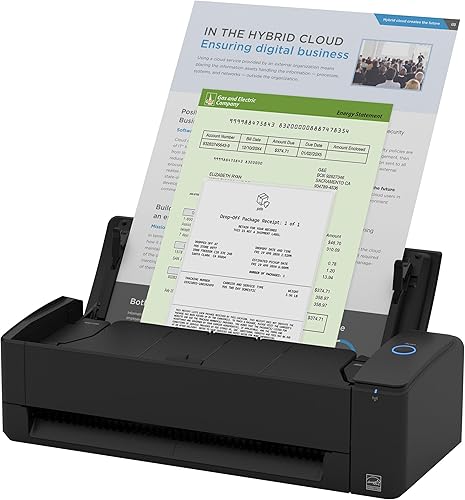
Which wireless scanner fits each home office?
The ScanSnap iX2500 suits recurring paperwork, while the iX1300 uses less desk space. The Epson FastFoto FF-680W is the most flexible pick here if your home office also needs to digitize batches of printed photos.
We compared the listed connectivity, feeder capacity, duplex features and stated scanning speeds against common home office tasks. Our score weighs specs and features against what you’re shopping for.
| Product | Best for | Connectivity | Photo batch | Document speed | Our score |
|---|---|---|---|---|---|
| Epson FastFoto FF-680W | photo and paper batches | Wi-Fi, USB | Up to 36 photos | Up to 45 ppm/90 ipm | 9.2 |
| ScanSnap iX2500 | frequent office paperwork | Wi-Fi, USB-C | 9.1 | ||
| ScanSnap iX1300 | a small shared desk | Wi-Fi, USB | 8.6 | ||
| Epson WorkForce ES-580W | computer-free scanning | Wi-Fi | 8.3 | ||
| Epson WorkForce ES-590W | high-volume document work | Wi-Fi, USB | 8.0 | ||
| Epson WorkForce ES-C320W | a compact wireless setup | Wi-Fi, USB | 7.9 | ||
| ScanSnap iX100 | scanning away from the desk | Wi-Fi, USB | 7.5 | ||
| Epson RapidReceipt RR-70W | receipts on the go | Wi-Fi | 7.5 |
The best wireless scanners for a home office
The right model depends on how often you scan, what you scan and where you want files to go. Each pick below has a distinct use, from photo preservation to receipts on the move.
Epson FastFoto FF-680W: Best for photo and paper batches
- Wi-Fi and USB connectivity
- Batch scans up to 36 photos
- Duplex photo scanning
- Document scanning up to 45 ppm/90 ipm
This photo-first scanner also handles documents, so it suits a home office that needs to digitize both paper files and family pictures.
Pros
- Scans both sides of photos in one pass
- Wi-Fi and USB
- Photo batch feeding
Cons
- Larger footprint than compact picks
- Photo features may go unused for paper-only work
The Epson FastFoto FF-680W is the best fit here if your home office includes a box of family photos along with paper files. It can batch-scan up to 36 photos at a time and capture handwritten notes on the back in the same scan.
Its Wi-Fi and USB connections give you choices for where to place it. Epson’s FastFoto app can add voice or text to photos and create slideshows, while the scanner’s image features include color restoration, red-eye reduction, cropping and rotation.
It also handles documents, with stated speeds up to 45 ppm/90 ipm and pages up to 240 in long. The included Epson ScanSmart software has OCR for turning scans into readable text.
This model takes more desk space than the compact document scanners here. Choose it if preserving photos is part of the job; if you only scan paperwork, a document-focused pick is a better match.
ScanSnap iX2500: Best for frequent office paperwork
- Wi-Fi 6 and USB-C
- 100-sheet document feeder
- Up to 45 ppm double-sided scanning
- Touchscreen profiles
A large feeder and fast double-sided scanning suit recurring paperwork, while profiles and cloud support give you several ways to send files.
Pros
- Large 100-sheet feeder
- Fast duplex scanning
- Wi-Fi or USB-C
Cons
- Larger than the smallest desk models
- Its office focus may be more than occasional users need
The ScanSnap iX2500 is the strongest general office pick for regular paper stacks. Its 100-sheet feeder and stated speed of up to 45 ppm double-sided suit recurring forms, bills and correspondence.
A large touchscreen lets you select personalized scan profiles. With Wi-Fi 6 or USB-C, you can send scans to computers, mobile devices or cloud services, and its software can automatically optimize, name and sort scanned files.
The iX2500 also has a brake roller system, a multi-feed sensor and skew detection to help manage paper feeding. Those features matter when a batch includes several pages and you want to reduce feeding problems.
Choose it for a busy desk where a large feeder and quick double-sided scanning will see regular use. If you scan only a few sheets at a time or need a smaller scanner, compare the iX1300.
ScanSnap iX1300: Best for a small shared desk
- Compact design
- Wi-Fi and USB
- Up to 30 ppm duplex scanning
- Handles documents, photos and cards
Its compact design takes less desk space than a larger feeder scanner, while Wi-Fi and double-sided scanning cover routine office documents.
Pros
- Compact footprint
- Duplex scanning
- Can scan without a computer
Cons
- Smaller 20-sheet feeder
- Lower stated speed than larger picks
The ScanSnap iX1300 fits a home office where desk space is limited but you still want a feeder and double-sided scanning. It has a 20-sheet capacity, Wi-Fi and USB, and stated duplex speeds up to 30 ppm.
It handles common office papers, photos, thick items and plastic cards. A single touch starts scanning, with automatic de-skew, color optimization and blank-page removal.
You can send scans to a computer, mobile device or cloud service, and the scanner can work without a computer. That makes it useful for a shared desk where you want scanning to take up less room when it is not in use.
The smaller feeder means more reloads for large batches than with 100-sheet models. For a closer look at its size and features, read our ScanSnap iX1300 review.
Epson WorkForce ES-580W: Best for computer-free scanning

- Wi-Fi connectivity
- 100-sheet feeder
- 4.3 in touchscreen
- Scan to USB, email or cloud without a computer
The touchscreen and direct-to-destination options fit a desk where you want to scan and send paperwork without starting a computer.
Pros
- Computer-free scanning options
- 100-sheet feeder
- Searchable PDFs with OCR
Cons
- Wi-Fi is the stated connection
- Takes more space than a compact scanner
The Epson WorkForce ES-580W suits people who want to scan and send documents without opening a computer. Its 4.3 in touchscreen can send files to USB, email or cloud services, and the 100-sheet feeder handles a substantial stack.
Epson gives a speed of up to 35 pages per minute and single-step technology for capturing both sides of a page. Its software can create searchable PDFs with OCR and convert scans to editable Word or Excel files.
The ES-580W connects over Wi-Fi. Epson says wireless scanning to a computer or cloud requires Epson ScanSmart software on the computer, while scans to smartphones and tablets use the Epson Smart Panel app.
Choose this model if computer-free scanning and a large feeder matter more than having USB connectivity. For a little more speed and both Wi-Fi and USB, compare the WorkForce ES-590W.
Epson WorkForce ES-590W: Best for high-volume document work

- Wi-Fi and USB
- 100-sheet feeder
- Up to 45 ppm double-sided scanning
- 4.3 in color touchscreen
A large feeder, touchscreen and direct scanning options suit frequent paperwork. It is a practical choice when you want capacity and speed in one desk scanner.
Pros
- 100-sheet feeder
- Fast double-sided scanning
- Touchscreen can send scans to email or cloud
Cons
- More scanner than occasional tasks require
- Check computer compatibility before choosing
The Epson WorkForce ES-590W is aimed at office users who scan paperwork often and want a desktop feeder with a touchscreen. It combines a 100-sheet feeder with double-sided scanning up to 45 ppm.
Its 4.3 in color touchscreen supports computer-free scanning to email, cloud storage or a USB flash drive. Wi-Fi and USB give you options for connecting it, and Epson ScanSmart includes AI features for preparing scanned documents as digital data.
The stated system requirement is Windows, so check compatibility if your home office uses another operating system. This is a capable fit for larger paper batches, but a compact model may be easier to place on a crowded desk.
Choose it when feeder size and speed matter most. If you scan occasional paperwork and want to save room, the ES-C320W has a smaller feeder and compact design.
Epson WorkForce ES-C320W: Best for a compact wireless setup

- Wi-Fi and USB
- 20-page feeder
- Up to 30 ppm double-sided scanning
- Scans paper, cards and passports
This compact model combines wireless scanning with a small feeder for routine stacks. Its flexible scan path also handles cards and passports.
Pros
- Compact design
- Wireless and USB connections
- Handles cards and passports
Cons
- 20-page feeder is smaller than larger desk models
- Not aimed at large daily batches
The Epson WorkForce ES-C320W suits a desk where every inch matters. Its compact design includes Wi-Fi and USB, a 20-page feeder and double-sided scanning up to 30 pages per minute.
It can scan paper, cards and passports through its flexible scan path. You can send scans wirelessly to computers, phones, tablets or cloud storage, and Epson Smart Panel provides another way to start a scan from a mobile device.
Its small feeder is best for everyday documents rather than big batches. If you regularly scan a full stack of tax papers, a larger feeder can save interruptions.
Choose the ES-C320W for compact wireless scanning at home. For a comparison of feeder size, duplex scanning and other selection points, see our guide to choosing a document scanner.
ScanSnap iX100: Best for scanning away from the desk

- Wi-Fi and USB
- Battery-powered operation
- Scans up to 260 documents per charge
- Handles receipts, photos and plastic cards
Its battery and compact body suit a home worker who scans in different rooms or takes paperwork along. It scans one side at a time.
Pros
- Battery-powered
- Lightweight and compact
- Works over Wi-Fi or USB
Cons
- Single-sided scanning
- Not a large automatic feeder
The ScanSnap iX100 is the portable pick for moving between rooms or scanning away from your desk. It runs on a battery that can scan up to 260 documents per charge, and it connects by Wi-Fi or USB.
This model scans one side at a time and feeds documents continuously. It handles receipts, photos, postcards and plastic cards, and can scan two small items at once.
The iX100 can send files to computers, mobile devices and cloud services. ScanSnap Cloud can also identify document types and route them to different cloud services.
Choose it for portability and a tangle-free setup. If your main job is scanning two-sided paperwork at a desk, a duplex feeder scanner will be more convenient.
Epson RapidReceipt RR-70W: Best for receipts on the go
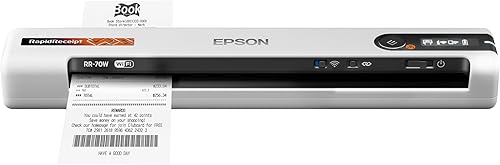
- Wi-Fi connectivity
- Under 11 oz
- Up to 15 ppm in Automatic Feeding Mode
- Designed for receipts, invoices and documents
This lightweight scanner targets receipts and narrow office documents. Its size and wireless connection make it easier to move between a desk and a work bag.
Pros
- Lightweight portable design
- Receipt-focused software features
- Wireless cloud scanning
Cons
- Not a high-capacity desktop feeder
- Slower stated speed than larger picks
The Epson RapidReceipt RR-70W is a lightweight option for receipts and invoices that need to follow you between a desk and a work bag. It weighs under 11 oz and scans at up to 15 ppm in Automatic Feeding Mode.
Its wireless connection works with computers, phones and tablets, with cloud destinations that include OneDrive, Dropbox and Google Drive. Epson’s Smart Panel app supports mobile scanning, and the software can create searchable or editable PDFs.
The RR-70W handles documents up to 8.5 x 72 in, which helps when you need to capture longer paper. It is a mobile scanner, not a high-capacity desk feeder, so it is less suited to frequent large batches.
Choose it if receipts and invoices are the main task. For receipts that need more space in a desktop workflow, see our receipt scanner guide.
How should you choose a wireless scanner for a home office?
Choose by feeder capacity, duplex scanning and where you want files to go. A compact scanner can handle small jobs, while a 100-sheet feeder is better suited to larger recurring batches.
How much feeder capacity do you need?
A 20-sheet feeder suits shorter stacks, while 100-sheet feeders on models such as the ScanSnap iX2500 and Epson WorkForce ES-590W reduce reloads. Think about the longest batch you usually scan, not just an average day.
For a simple scan of a few receipts, a portable scanner may be enough. If you scan folders of two-sided tax papers, choose a feeder scanner with duplex capability.
Is duplex scanning useful for office documents?
Duplex scanning is useful when forms or records have text on both sides. It captures both sides of each page, which saves the step of turning over a stack and scanning it again.
The iX2500, iX1300, ES-580W and ES-590W all include double-sided scanning features. If you mostly scan single-page receipts, duplex speed may matter less than compact size or easy file sorting.
Where should scans go?
Choose a scanner that supports the destinations you use, such as a computer folder, phone, USB drive, email or cloud storage. Some models offer direct sending to certain destinations, while others use a computer or mobile app.
The ES-580W supports computer-free scanning to USB, email or cloud services. The iX2500 and iX1300 offer Wi-Fi or USB connections and support sending scans to computers, mobile devices and cloud services.
Will a compact scanner fit your paperwork?
Compact models work well when you have limited desk space and scan smaller batches. The iX1300 and ES-C320W each have a 20-sheet feeder, while the iX100 is a portable single-sided option.
Measure the desk area you can spare and account for how you will feed and collect paper. If you scan longer batches, a larger desktop model may be worth the extra room.
Do you need a scanner for photos too?
A document scanner is the usual choice for bills, forms and receipts. If you also have a large box of prints to digitize, the FastFoto FF-680W is designed for photo batches and can scan both sides of a photo in one pass.
For everyday document scanning, a document-focused model can be simpler to choose. Our guide to duplex scanners for home use covers another useful feature for paper records.
Which wireless home office scanner should you choose?
Choose the ScanSnap iX2500 for recurring stacks of double-sided paperwork, the iX1300 when desk space is tight, or the FastFoto FF-680W when photos are part of the work. For occasional receipts away from the desk, consider the iX100 or RapidReceipt RR-70W.
If you’re still weighing scanner types, start with the home scanner guide and narrow your choice by what you scan most often.
Our top 3 picks at a glance
-
1
-
2
-
3
Frequently asked questions
What should a wireless scanner for a home office have?
Choose a scanner with Wi-Fi, a feeder sized for your usual paper stacks, and double-sided scanning if you handle two-sided forms. A touchscreen can send scans without a computer on some models.
Check that its software works with your computer or mobile device before you buy.
Is a compact scanner enough for home office paperwork?
A compact scanner can work well if you scan short stacks and need to save desk space. The ScanSnap iX1300 and Epson WorkForce ES-C320W each have a 20-sheet feeder.
For frequent or larger batches, a 100-sheet feeder means fewer reloads.
Can a wireless scanner work without a computer?
Some can. The Epson WorkForce ES-580W can send scans to a USB drive, email or cloud services without a computer, and the ScanSnap iX1300 can be used without one.
Check the setup steps and supported destinations for your device before choosing.
Should I choose a document scanner or a photo scanner?
Choose a document scanner for regular paperwork, receipts and forms. A photo scanner makes more sense if you also need to process batches of prints: the Epson FastFoto FF-680W can batch-scan up to 36 photos.
For a broader comparison, see our guide to scanners for home use.
What is a duplex scanner?
A duplex scanner captures both sides of a sheet, which is useful for two-sided forms and correspondence. Some models scan both sides in one pass, while others may use a different process.
Our guide explains what a duplex scanner does and when it helps.


