8 Best Photo Scanners for Mac (November 2026)
The best best photo scanners for Mac include the Epson FastFoto FF-680W for batch scanning family photo stacks, the ScanSnap iX2500 for mixed photos and paperwork, and the Canon CanoScan LiDE 400 (best flatbed for single fragile photos).
On this page (5 sections)
The best photo scanner for Mac overall is the Epson FastFoto FF-680W, because it feeds up to 36 photos at a time and scans about one per second. Choose the ScanSnap iX2500 if you need a fast duplex document feeder too, or the Canon CanoScan LiDE 400 for a flatbed that scans one fragile print at high resolution.
Every pick here works with macOS and connects over USB, so you can scan into Apple's own Image Capture or straight into the maker's app. What separates them is how they feed photos and what they do with old or delicate prints.
Our picks split into three jobs: fast batch feeders for boxes of snapshots, flatbeds for single high-resolution scans, and compact feeders for mixed paperwork. For a broader look at home scanning setups, see our roundup of the best home scanner for photos.
Our picks at a glance
-
1

-
2

-
3

The best photo scanners for Mac, by the job you need done
The Epson FastFoto FF-680W is the top pick for most Mac owners clearing a stack of family photos. The rest solve more specific problems: gentle handling for old prints, a flatbed for single scans, or a small feeder for a crowded desk.
Epson FastFoto FF-680W: Best for batch scanning family photo stacks
- Up to 1 photo per second at 300 dpi
- Batch feeds up to 36 photos
- Wireless and USB
- Duplex scan captures notes on the back
The fastest way to clear a box of snapshots, with Wi-Fi so your Mac does not need to sit beside it.
Pros
- Feeds up to 36 photos at once
- Duplex scan of back-side notes
- USB and Wi-Fi connectivity
- 1200 dpi interpolation for enlargements
Cons
- Sheet feeder needs care with delicate prints
- CIS sensor, not CCD
- Largest footprint in this group
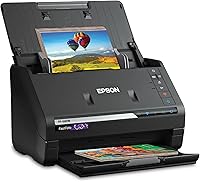
The FastFoto is built for volume. It batch-feeds up to 36 photos at a time and Epson says it scans about one photo per second at 300 dpi, which turns a shoebox of prints into a weekend project rather than a month.
Load the photos in landscape to reach that rated speed.
Its duplex scan is the feature that matters most for family archives. It captures the image and any handwritten note on the back in a single pass, so dates and names stay with the photo instead of being lost.
It scans Polaroids, panoramas and postcards too, plus photos up to 8 x 10 in.
Epson's image tools handle auto enhancement, color restoration, red-eye reduction, de-skew, crop and rotate. Format options cover sharing at 300 dpi, archiving as 600 dpi TIFF and enlarging at 1200 dpi interpolated, and the scanner connects over USB or Wi-Fi so your Mac does not have to sit next to it.
The FastFoto app adds voice and text over photos and builds slideshows from your phone.
It's also a document scanner, rated up to 45 ppm with ScanSmart OCR to turn scans into searchable text. The SafeTouch carrier sheet and cleaning cloth help with delicate prints.
The trade-off is its footprint: at 11.7 in wide and 8.2 lb, it needs a permanent spot. Buy it if you have stacks of snapshots and documents to clear in one go.
ScanSnap iX2500: Best for mixed photos and paperwork
- 45 ppm double-sided scanning
- 100-sheet feeder
- Large touchscreen
- Wi-Fi 6 and USB-C
A fast duplex feeder that also handles photos, with a touchscreen for sending scans to your Mac or the cloud.
Pros
- 100-sheet feeder
- 45 ppm duplex speed
- Wi-Fi 6 or USB-C
- Automatically names and sorts files
Cons
- Photo work sits alongside heavy document duty
- CIS sensor
- Largest feeder here
The iX2500 is the pick when photos share desk time with paperwork. Its 100-sheet feeder and 45 ppm duplex speed clear documents quickly, and ScanSnap's software automatically optimizes, names and sorts files so photos and receipts land in the right place.
The large touchscreen works like a phone, and personalized profiles send scans to your Mac, mobile devices or cloud services. Wi-Fi 6 and USB-C both work, and the Quick Menu drags scans into your favorite apps on the computer.
ScanSnap Cloud also lets you scan without a computer attached.
Its brake roller, multi-feed sensor and skew detection are there to stop jams and protect pages, which counts when a photo is stuck to a receipt. Photo handling is still the weaker side against the FastFoto: its CIS sensor and document-first design suit mixed batches more than a pure photo archive, and the size makes it a fixed desk machine.
For documents next to photo batches, this is the faster overall package. Choose it if your scanning is mostly paperwork with some photos mixed in.
Canon CanoScan LiDE 400: Best flatbed for single fragile photos
- 4800 x 4800 dpi optical resolution
- 8-second scans
- USB-C single cable
- Color restore and dust removal
A slim flatbed for scanning one print at a time at high resolution, with enhancement tools for faded photos.
Pros
- 4800 x 4800 dpi optical resolution
- Slim 0.4 in body
- One USB-C cable for power and data
- Built-in color restore
Cons
- One sheet at a time
- USB only, no wireless
- Slow for large batches
The LiDE 400 is the flatbed to buy for single prints you want at high resolution. At 4800 x 4800 dpi optical, it captures far more detail than the sheet feeders here, which makes it the pick for a wedding portrait or a print you plan to enlarge.
You place each photo by hand, so nothing is pulled through rollers. That matters for creased, curled or very old prints that a feeder could jam.
Canon's color restore and dust removal help faded photos look better after the scan, and the 48-bit color depth gives the software more to work with.
It's slim at 0.4 in and runs from one USB-C cable for both power and data, with 8-second scans. Its EZ buttons and auto scan mode handle the everyday jobs, and the built-in PDF button saves searchable, editable files.
The trade-off is throughput: one sheet at a time means a large album takes hours. Pick it for quality over quantity, and for photos you would rather not feed through a machine.
ScanSnap iX1300: Best compact feeder for small desks
- Space-saving design
- Up to 30 ppm duplex
- Wi-Fi or USB
- Handles thick items and plastic cards
A small-footprint duplex feeder that scans photos, cards and receipts without crowding your desk.
Pros
- Compact footprint
- 30 ppm duplex speed
- Wi-Fi or USB
- Automatic de-skew and blank page removal
Cons
- 20-sheet feeder
- CIS sensor
- Less depth for bulk photo batches
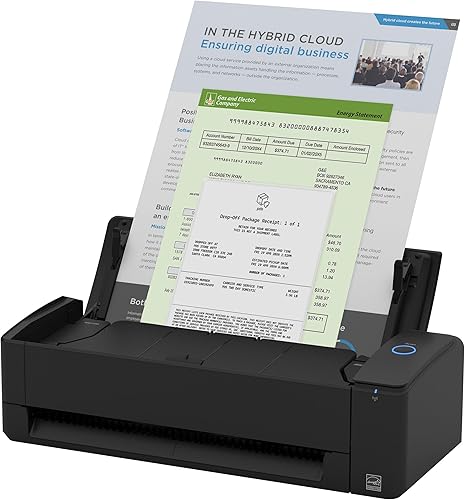
The iX1300 is the feeder for a small desk. Its space-saving body folds away when idle, yet it scans duplex at up to 30 ppm with automatic de-skew, color optimization and blank page removal.
A single touch starts the scan, with no driver setup.
It handles photos, cards and thick items that lighter feeders struggle with. You can connect by USB or Wi-Fi and send scans to your Mac or the cloud, and it can scan without a computer, including to a Chromebook through the mobile app.
ScanSnap Home keeps photos, documents and receipts in one library.
The 20-sheet feeder and CIS sensor keep it behind the iX2500 for long batches. Still, for a Mac owner with limited desk room who scans a handful of photos and receipts at a time, the smaller footprint is the whole point.
Choose it when desk space is tight but you still want a duplex feeder.
Epson WorkForce ES-50: Best for scanning photos away from the desk

- Single page in about 5.5 seconds
- USB powered, no battery
- Scans up to 8.5 x 72 in
- Windows and Mac compatible
A travel-friendly feeder that draws power from your Mac over USB and slips into a bag.
Pros
- Light and portable
- USB powered, no batteries
- 1200 dpi resolution
- Handles long pages
Cons
- One sheet at a time
- USB only
- No wireless
The ES-50 is for scanning away from the desk. It's the lightest single-sheet feeder here at 9.44 oz, draws power from your Mac over USB with no battery or adapter, and slips into a laptop bag.
It scans a single page in about 5.5 seconds and handles pages up to 8.5 x 72 in, so receipts and long documents are easy. It also scans at up to 1200 dpi, which beats the sheet feeders on resolution and gives photos more detail per pass.
It digitizes receipts and ID cards for bookkeeping too.
The trade-off is that it feeds one sheet at a time and works over USB only. Epson ScanSmart software plus Nuance OCR turns scans into searchable PDFs and editable Word and Excel files, and automatic feeding mode combines multi-page scans into one file.
For a Mac owner digitizing a few photos and receipts while traveling or visiting family, the portability wins. Pick it if you scan in different places rather than at one desk.
Plustek ePhoto Z300: Best CCD pick for old faded photos

- CCD sensor
- 4x6 photo in about 2 seconds
- Handles Polaroid thickness under 0.76mm
- Auto-crop and color restore
A gentle roller feed with a CCD sensor, built for fragile prints and thick Polaroids.
Pros
- CCD sensor for color depth
- Gentle roller feed
- Scans thick Polaroid prints
- One-click enhancement tools
Cons
- Simplex only, no back-side notes
- USB only
- Feeds one photo at a time
The ePhoto Z300 is the CCD pick here. Plustek uses a CCD sensor for better color accuracy and dynamic range than CIS, which helps faded prints keep detail in both highlights and shadows.
Its deeper focus range also reads surfaces that are not perfectly flat.
Its roller feed is designed to be gentle on fragile prints, and it accepts thick items up to 0.76mm, including Polaroids. A 4x6 photo takes about 2 seconds, so roughly 1,000 photos fit into an afternoon.
The software auto-crops, rotates and restores faded color, and it saves in several formats with one-click sharing to Facebook, X or Google Drive.
The limits are real: it's simplex only, so it can't capture notes on the back in one pass, though the software can merge two images into one file. It also feeds one photo at a time over USB and tops out at 600 dpi.
For old or thick prints you want handled gently with a better sensor, though, it's the pick. If sensor type matters to you, read what a CCD scanner is and why it suits photos.
Canon CanoScan LiDE 300: Best budget flatbed for occasional scans

- 2400 x 2400 dpi optical resolution
- 10-second scans
- 4 EZ buttons
- Send to Cloud button
A low-cost flatbed for the occasional print or document, with one-button cloud upload.
Pros
- Lowest-cost flatbed here
- 2400 x 2400 dpi
- Fade correction and dust reduction
- Send to Cloud button
Cons
- USB only
- Lower resolution than the LiDE 400
- One sheet at a time
The LiDE 300 is the budget flatbed. At 2400 x 2400 dpi and 10-second scans, it handles the occasional print or document without costing much, and its fade correction and dust reduction keep old photos looking their best.
It carries the same 48-bit color depth as the LiDE 400.
Four EZ buttons and a Send to Cloud button make it simple to upload scans to OneDrive or Dropbox. Auto Scan Mode detects what you place and adjusts settings, and a built-in PDF button creates searchable files through OCR.
It also scans photos, receipts and business cards.
The trade-offs against the LiDE 400 are resolution and speed: 2400 dpi versus 4800 dpi, and 10 seconds versus 8. Both are flatbeds that take one sheet at a time at 1-sheet capacity, so neither suits large batches.
The LiDE 300 also uses a USB 2.0 cable rather than USB-C. Buy it for light, occasional scanning where the lowest cost matters most.
HP Small Photo and Document Scanner HPPS100: Best for slipping into a laptop bag

- 15 ppm simplex
- Up to 1200 dpi
- USB 2.0 powered
- PC and Mac compatible
A tiny simplex feeder for quick document and photo captures while traveling.
Pros
- Very light and small
- USB powered
- Up to 1200 dpi
- Handles receipts and cards
Cons
- Simplex only
- No wireless
- Slower than the ES-50
The HPPS100 is the smallest pick. At 3 oz and 1.4 in tall, it slides into a bag or briefcase and scans one-sided documents, photos, receipts and cards in a single pass.
Its footprint is tiny, and it powers over USB 2.0 with no battery.
It runs at 15 ppm, about 4 seconds per page, and up to 1200 dpi for black-and-white or color jobs. HP WorkScan software for Windows and MacOS adds auto-scan, size detection, preview and zoom, crop and edit, plus background cleanup.
It takes paper from 2 x 2.9 in up to 8.5 x 14 in.
Against the ES-50, it's lighter but slower and simplex only. It also has no wireless, so it stays tethered to your Mac.
For a Mac owner who needs a tiny scanner for quick captures on the road and already owns a main scanner at home, it's a handy second machine. Choose it for portability above all, not as your main photo scanner.
How these Mac photo scanners compare
| Product | Best for | Scanner type | Optical sensor | Max optical resolution | Our score |
|---|---|---|---|---|---|
| Epson FastFoto FF-680W | batch scanning family photo stacks | Sheet-fed document and photo | CIS | 600 dpi | 9.2 |
| ScanSnap iX2500 | mixed photos and paperwork | Document and business card | CIS | 600 dpi | 9.1 |
| Canon CanoScan LiDE 400 | flatbed for single fragile photos | Flatbed | CIS | 4800 dpi | 8.7 |
| ScanSnap iX1300 | compact feeder for small desks | Document and receipt | CIS | 600 dpi | 8.6 |
| Epson WorkForce ES-50 | scanning photos away from the desk | Portable single-sheet-fed document | CIS | 1200 dpi | 8.5 |
| Plustek ePhoto Z300 | CCD pick for old faded photos | Photo and document | CCD | 600 dpi | 8.3 |
| Canon CanoScan LiDE 300 | budget flatbed for occasional scans | Document and photo flatbed | CIS | 2400 dpi | 8.0 |
| HP Small Photo and Document Scanner HPPS100 | slipping into a laptop bag | Portable single-sheet-fed document | CIS | 1200 dpi | 7.1 |
How we compared these scanners for Mac
We started with what a Mac owner actually needs: native macOS support, a USB or wireless connection that works with a Mac, and a feed path that suits the photos on hand. Every product here supports macOS, and each model states its minimum version.
That list matters more than people expect, since the maker's app and driver are what open the enhancement and OCR features.
From there we weighed scan speed and feeder size for batches, optical resolution for detail and enlargements, and sensor type for old or faded prints. Duplex scanning counted heavily for family archives with notes on the back, because a single pass keeps the image and its caption together.
Interpolated resolution was treated as a bonus, not the headline number, since optical resolution is what the sensor actually reads.
We also checked the extras that make a scanner easier to live with on a Mac: image enhancement tools, OCR, cloud upload and software that sends scans to the computer or straight into your photo library. Our score weighs specs, features and buyer feedback against what you're shopping for.
What the software side means for a Mac user
The scanner's own driver is only half the setup. On a Mac, the FastFoto app lets you add voice and text over photos and build slideshows, and the two Canon flatbeds add fade correction, dust reduction and a Send to Cloud button for OneDrive and Dropbox.
The ScanSnap models lean on ScanSnap Home or ScanSnap Cloud to name and sort files and to scan without a computer.
Epson ScanSmart and Nuance OCR on the two Epson machines turn scans into searchable PDFs and editable Word and Excel files. HP WorkScan covers auto-scan, size detection and background cleanup for the HPPS100.
If searchable documents matter as much as the photos, weigh this list alongside the hardware specs.
Which photo scanner fits your Mac and your photos?
Most Mac owners should start with a fast sheet feeder, then add a flatbed only if they have fragile or thick prints. The rest comes down to how many photos you have and how much desk room you can give up.
A third option, the compact travel feeder, is best as a second scanner rather than your only one.
Is a sheet-fed scanner or a flatbed better for a Mac photo project?
A sheet-fed scanner wins for stacks and a flatbed wins for single delicate photos. If you have hundreds of snapshots and want them done fast, choose a feeder like the FastFoto FF-680W.
If your collection is small or fragile, a flatbed like the LiDE 400 scans each print with more care and detail. The flatbed also lets you place an odd-sized item by hand when a feeder would not grip it safely.
How much resolution do you need for old family photos?
600 dpi is enough for most old prints you plan to view or share, while 1200 dpi gives room to enlarge. The FastFoto offers 600 dpi TIFF archiving and 1200 dpi for enlarging.
A flatbed's 4800 dpi helps when you want to pull detail out of a single small print. Remember that 1200 dpi on a feeder may be interpolated, so the true read is 600 dpi.
Should you pick a CCD or CIS sensor for scanning photos?
Choose CCD when color depth matters, especially for faded or high-contrast prints. The Plustek ePhoto Z300 is the CCD pick here, and its sensor reads a wider dynamic range.
CIS sensors are cheaper and lighter, and they handle everyday snapshots well. They are also what most of the feeders here use, so the sensor choice usually follows the feed type you pick.
What should you check before buying a scanner for a Mac?
Check three things: the stated macOS compatibility, the connection type (USB, Wi-Fi or both), and how the scanner feeds photos. USB-only models tie the scanner to your Mac's side, while wireless models let you place it anywhere in the room.
A Wi-Fi 6 model like the iX2500 gives the most stable wireless link, and a USB-powered portable needs no wall outlet at all.
Can these scanners handle cards and documents as well as photos?
Yes. The ScanSnap models are document-first machines that also scan photos and cards, and the Epson scanners include OCR software for searchable documents.
The portable HP and Epson feeders are built for receipts and ID cards as well. If trading cards are your main job, our roundup of the best photo scanner for trading cards covers the handling that matters there.
How do you set up a Mac photo scanner for a big family archive?
Start by sorting prints into batches of similar size so the feeder pulls them evenly, and load landscape for the rated speed. Scan to a folder in your Pictures library so Apple Photos can import them, and keep a 600 dpi TIFF copy as your archive before you crop or enhance.
Back up that folder to a second drive as you go.
The verdict: the best photo scanner for Mac for most people
The Epson FastFoto FF-680W is the best photo scanner for Mac for most households, because it batch-feeds up to 36 photos and captures back-side notes in one pass. Pick the ScanSnap iX2500 if documents dominate your scanning, or the Canon LiDE 400 for a single fragile print at high resolution.
For old or thick prints, the Plustek ePhoto Z300 and its CCD sensor are the gentler choice. If your collection is faded and fragile, our guide to the best scanner for old photos and documents goes deeper on handling.
Our top 3 picks at a glance
-
1
-
2
-
3
Frequently asked questions
Do photo scanners work with a Mac without extra software?
Yes. Every scanner here supports macOS and scans straight into the Mac's own Image Capture utility.
The maker's app adds the enhancement and cloud features, and the model you buy states its minimum macOS version.
Can I scan photos straight into Photos on a Mac?
Yes. Use the scanner's TWAIN driver or the maker's app to scan, then import the files into Apple Photos.
Most apps also let you choose an output folder, so you can drag the scans into Photos yourself.
How many photos can a feeder scanner handle in one batch?
The Epson FastFoto FF-680W takes up to 36 photos at a time, while the ScanSnap iX2500 feeder holds 100 sheets. Smaller feeders like the iX1300 hold about 20.
Load in landscape for the rated speed.
What resolution do I need for scanning family photos?
300 dpi covers sharing and viewing on a screen, while 600 dpi gives more room to crop or enlarge. For high-resolution flatbed work on single prints, the Canon LiDE 400 reaches 4800 x 4800 dpi optical.
Why choose a CCD sensor scanner over a CIS one?
A CCD sensor reads color with more dynamic range, which helps faded prints and photos with both bright and dark areas. The Plustek ePhoto Z300 is the CCD pick here; the rest use CIS sensors.