9 Best Auto-Feed Photo Scanners for Big Photo Boxes (October 2026)
The best auto-feed photo scanners for large photo collections include the Epson FastFoto FF-680W for large photo batches, the ScanSnap iX2500 Photo Edition for wireless photo batches, and the Canon imageFORMULA RS40 for mixed photo and paper batches.
On this page (4 sections)
The Epson FastFoto FF-680W is the best auto-feed photo scanner for most large photo boxes because it can batch up to 36 prints, scan both sides and work with photos up to 8 x 10 inches. The ScanSnap iX2500 Photo Edition is another photo batch option, while the Plustek ePhoto Z300 feeds one print at a time.
An auto-feed scanner can reduce the repeated handling involved in digitizing a box of loose prints. For old or fragile photos, use the carrier sheet and handling guidance for the model, and set aside prints that are curled, cracked or stuck together.
For help splitting a batch into separate image files, see our guide on how to scan multiple photos at once. If you are choosing among home photo options more broadly, compare our best home scanners for family photos and scanners for old photos and family papers.
Our picks at a glance
-
1

-
2

-
3
Which auto-feed photo scanners suit large photo boxes?
The best auto-feed photo scanner for a big archive should balance batch size, photo handling and the kinds of files you also need to digitize. These picks are ordered by how well their stated features match a photo-box job.
We compared the available features for photo batches, feeder capacity, photo protection and useful adjustments. Our score weighs specs, features and buyer feedback against what you're shopping for.
| Product | Best for | Photo batch size | Connectivity | Photo size | Our score |
|---|---|---|---|---|---|
| Epson FastFoto FF-680W | large photo batches | Up to 36 photos | USB and Wi-Fi | Up to 8 x 10 in | 9.2 |
| ScanSnap iX2500 Photo Edition | wireless photo batches | Up to 36 photos | USB and Wi-Fi | 8.5 | |
| Canon imageFORMULA RS40 | mixed photo and paper batches | USB | 8.4 | ||
| Plustek ePhoto Z300 | simple one-at-a-time feeding | USB | 3 x 5 to 8 x 10 in | 8.3 | |
| Epson WorkForce ES-400 II | paper-heavy collections | USB | 8.7 | ||
| Epson WorkForce ES-580W | wireless paper archiving | Wi-Fi | 8.3 | ||
| ScanSnap iX1300 | small desks | USB and Wi-Fi | 8.6 | ||
| ScanSnap iX2500 | documents beside the photo box | Wi-Fi and USB-C | 9.1 | ||
| HP Small Photo and Document Scanner HPPS100 | occasional photo scans on the go | USB | 7.1 |
Epson FastFoto FF-680W: Best for large photo batches
- Batch scan up to 36 photos
- As fast as 1 photo per second at 300 dpi
- Carrier sheet included
- Scans both sides in one pass
Made for large photo jobs, this scanner can batch up to 36 photos and capture notes on the back in the same pass. Its carrier sheet and photo adjustments suit buyers preserving varied family prints.
Pros
- Batch scanning for up to 36 photos
- Captures both sides of a photo
- Photo restoration and adjustment tools
Cons
- Needs care when feeding delicate prints
- Larger than a compact portable scanner
The Epson FastFoto FF-680W is the clearest fit when the main job is scanning a large set of loose prints. It can scan up to 36 photos in a batch and is described as scanning as quickly as one photo per second at 300 dpi.
It handles photos up to 8 x 10 inches, along with Polaroids, panoramas and postcards. Its included carrier sheet and SafeTouch technology are intended to support careful handling of delicate prints.
The scanner captures both sides in a single pass, which can preserve handwriting on the back. Epson's FastFoto tools include auto enhancement, color restoration, red-eye reduction, de-skewing, cropping and rotation.
Choose it when photo batches are the priority and you want photo-specific adjustments. Its wireless and USB connections also give you options for where to place it.
ScanSnap iX2500 Photo Edition: Best for wireless photo batches
- Feeder holds up to 36 photos
- Includes 3 photo carrier sheets
- Wi-Fi and USB connectivity
- Automatic rotation, cropping and color restoration
This photo-focused edition pairs a 36-photo feeder capacity with three carrier sheets for delicate prints. Wi-Fi and USB give you options for sending scans to devices and cloud services.
Pros
- Includes 3 photo carrier sheets
- Wireless or USB connection
- Photo profiles and automatic adjustments
Cons
- Photo speed claim is up to 100 photos per minute
- Designed for photos and documents rather than film
The ScanSnap iX2500 Photo Edition is a close match for buyers who want a feeder built around photos and documents. It holds up to 36 photos or up to 100 documents and comes with three photo carrier sheets for delicate prints.
It offers Wi-Fi and USB connectivity, plus touchscreen profiles for sending scans to computers, mobile devices and cloud services. Photo features include automatic rotation, cropping, color restoration and red-eye reduction.
The stated photo speed is up to 100 photos per minute. Choose this model if you want the photo carrier sheets and the iX2500's wireless workflow in one scanner.
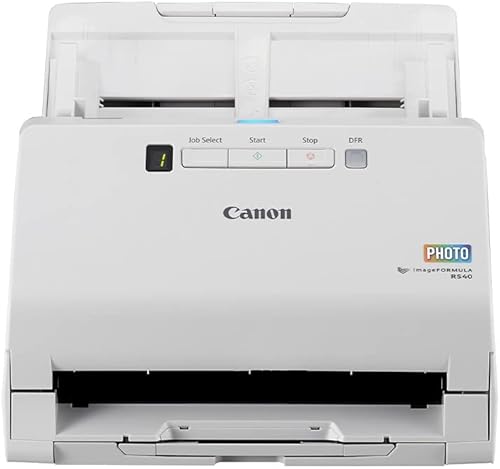
Canon imageFORMULA RS40: Best for mixed photo and paper batches
- Automatic feeder holds up to 60 sheets
- Scans both sides at once
- Handles photos and documents in mixed batches
- Photo enhancement software included
The RS40 handles photo and document batches, which helps when a box includes prints alongside receipts or papers. Its included software offers photo enhancement and red-eye correction.
Pros
- Mixed photo and document scanning
- Duplex scanning
- Includes photo enhancement software
Cons
- USB connection only
- Photo batch speed is not specified here
The Canon imageFORMULA RS40 suits a box that contains both prints and papers. Its feeder can handle up to 60 sheets, and Canon says it scans both sides of photos and documents at the same time.
The included CaptureOnTouch software can enhance photos and correct red-eye. The scanner also handles mixed batches of photos and documents, including Polaroids, receipts and cards.
Its connection is USB, so plan for a place near the computer. Choose it when mixed media matters more than Wi-Fi or photo-specific batch speed.
Plustek ePhoto Z300: Best for simple one-at-a-time feeding

- Insert photos one at a time
- Supports 3 x 5 through 8 x 10 in photos
- 600 dpi optical resolution
- Auto-crop, rotate and color restoration
The ePhoto Z300 feeds prints one at a time rather than using a large stack feeder. It supports common print sizes through 8 x 10 inches and includes image adjustment tools.
Pros
- Supports several common print sizes
- Photo enhancement tools included
- CCD sensor
Cons
- No batch feeder
- USB connection only
The Plustek ePhoto Z300 feeds photos one at a time, so it isn't the fastest choice for a large stack. That simple feed can still work well if you prefer to inspect each print before scanning it.
It supports photo sizes from 3 x 5 through 8 x 10 inches and has 300 dpi and 600 dpi settings. Its software includes auto-crop, rotation and faded-color restoration.
The Z300 connects by USB and can also scan letter and A4 paper. Choose it for controlled single-photo feeding rather than unattended batches.
Epson WorkForce ES-400 II: Best for paper-heavy collections

- 50-sheet automatic document feeder
- Duplex scanning
- Double-feed detection
- Searchable PDFs with OCR
This document scanner is better suited to papers that accompany a photo archive than to photo-first batches. Its 50-sheet feeder, duplex scanning and OCR support document sorting.
Pros
- 50-sheet feeder
- Double-feed detection
- OCR for searchable PDFs
Cons
- Document scanner rather than a photo-focused model
- USB connection only
The Epson WorkForce ES-400 II is a document scanner that can help digitize papers stored with family photos. Its 50-sheet feeder and duplex scanning suit forms and documents, while double-feed detection helps flag pages that stick together.
Epson ScanSmart can create searchable PDFs with OCR and supports previewing and sending files to email or cloud storage. The scanner connects by USB.
Its features are document-focused, so choose it for the paper part of an archive. For photo-first batches, one of the dedicated photo picks above is a better match.
Epson WorkForce ES-580W: Best for wireless paper archiving

- 100-sheet document feeder
- Wi-Fi connectivity
- Touchscreen
- Scans to USB, email and cloud services
The ES-580W is a document scanner with a large feeder and wireless destinations. It can help digitize papers stored with photos, but its described features focus on documents.
Pros
- 100-sheet feeder
- Wireless scanning
- Can scan without a computer to supported destinations
Cons
- Document-focused model
- Photo batch handling is not specified here
The Epson WorkForce ES-580W is aimed at document batches, with a 100-sheet feeder and wireless scanning. Its touchscreen can send scans to a phone, tablet, computer or cloud account, and it can also save to USB or email without a computer.
The scanner supports duplex capture and searchable PDFs with OCR. Epson's image adjustments include auto-crop, blank-page deletion, background removal and paper-skew correction.
Choose it when paper archiving and wireless destinations matter more than photo-specific handling. The available features don't describe a dedicated photo batch workflow.
ScanSnap iX1300: Best for small desks
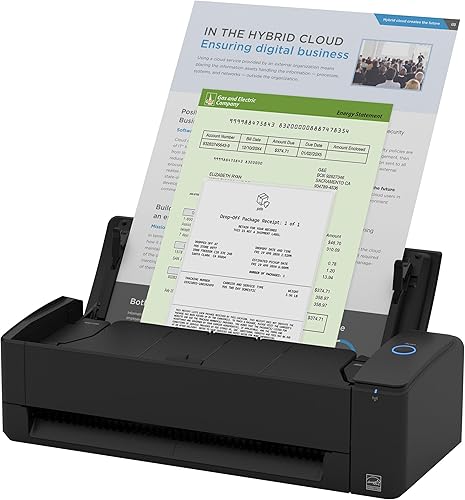
- Compact footprint
- Handles documents, photos and cards
- Wi-Fi and USB connectivity
- Automatic de-skew and color optimization
The compact iX1300 fits a small desk and can scan photos alongside documents and cards. Its 20-sheet capacity makes it a more modest choice for a large photo backlog.
Pros
- Compact design
- Wi-Fi or USB connection
- Handles photos and several document types
Cons
- Smaller feeder capacity than larger batch picks
- Photo-specific carrier sheets are not specified here
The ScanSnap iX1300 is a compact option for a desk that has little spare space. It handles photos, cards and documents, and connects over Wi-Fi or USB.
Its stated feeder capacity is 20 sheets, which is more limited than the larger photo-batch options here. Automatic de-skew, color optimization and blank-page removal can reduce routine adjustments.
Choose it when a compact scanner will serve mixed everyday tasks and photo batches are occasional. For a big box of prints, consider a model with a larger photo capacity.
ScanSnap iX2500: Best for documents beside the photo box

- 100-sheet document feeder
- 45 ppm double-sided scanning
- Wi-Fi 6 and USB-C
- Automatic file naming and sorting
The iX2500 is a high-capacity document scanner for buyers who also need to organize papers near their family photos. The standard model is described for documents, receipts, photos and business cards.
Pros
- 100-sheet feeder
- Wireless and USB-C connections
- Automatic file naming and sorting
Cons
- Photo-specific carrier sheets are not specified here
- Document-focused model
The ScanSnap iX2500 has a 100-sheet document feeder, Wi-Fi 6 and USB-C connectivity. It can organize scans with automatic file naming and sorting, which can help when you are digitizing paperwork alongside family records.
The standard model is described as handling documents, receipts, photos and business cards. Its listed features focus on document organization, so it is less specifically equipped for photo batches than the Photo Edition.
Choose it if the same scanner will mainly process documents and occasionally handle photos. For a box of prints, compare its Photo Edition sibling first.
HP Small Photo and Document Scanner HPPS100: Best for occasional photo scans on the go

- Portable single-sheet scanner
- USB-powered
- Scans photos and documents
- Auto-scan and size detection
The slim HPPS100 is for light, portable scanning rather than processing a box of prints. Its single-sheet feed can handle an occasional photo or paper when space matters.
Pros
- Slim, lightweight design
- Scans photos and documents
- USB-powered
Cons
- Single-sheet feed
- Not intended for large archives
The HPPS100 is a lightweight, single-sheet scanner for occasional portable jobs. It scans photos and papers over USB and includes software for previewing, cropping and adjusting image quality.
A single-sheet feed means each photo needs to be inserted separately, so it is not suited to quickly clearing a large box. Choose it when portability and occasional use matter more than batch capacity.
How should you choose a photo scanner with a feeder?
Choose by the number of prints you want to scan per session and how delicate those prints are. A larger feeder can reduce interruptions, but carrier sheets and photo-specific handling matter for older prints.
For a box of loose, sturdy photos, compare the FastFoto FF-680W and iX2500 Photo Edition because each supports batches of up to 36 photos. If the collection includes notes on the backs, the FastFoto's single-step duplex scan is a useful fit.
If you expect to mix photos with receipts and papers, the Canon RS40 can scan mixed batches and both sides. A document-focused model may be more useful when paperwork, rather than prints, fills most of the archive.
What should you prepare before scanning a large photo batch?
Sort the prints by size and condition before loading them. Remove clips, keep curled or damaged photos out of the feeder, and follow the scanner's instructions for carrier sheets.
A little organization up front can also make the digital files easier to use. For a detailed workflow, read our tips for scanning old photos, including how to prepare prints and avoid repeat work.
Decide on a file naming plan before the first batch, such as year, event and family name. If your scans will be used for prints or large displays, see our guide to photo scan resolution.
Which auto-feed photo scanner should you pick?
Pick the Epson FastFoto FF-680W for a large print archive with batches up to 36, duplex photo capture and photo adjustments. Choose the ScanSnap iX2500 Photo Edition if you want carrier sheets and wireless scanning, or the Canon RS40 for mixed photo and paper batches.
For smaller or more occasional jobs, consider the Plustek ePhoto Z300's one-at-a-time feed or the compact ScanSnap iX1300. If your box also includes albums and delicate prints, our guide to the best home photo scanners can help you compare other scanning approaches.
Our top 3 picks at a glance
-
1
-
2
-
3
Frequently asked questions
What is the best auto feed photo scanner for a large collection?
The Epson FastFoto FF-680W is a strong choice for a large collection because it can batch up to 36 photos at a time and capture both sides in one scan.
The ScanSnap iX2500 Photo Edition also holds up to 36 photos and includes three carrier sheets for delicate prints.
Can an auto-feed scanner damage old photos?
Any feeder needs careful use with prints that are curled, cracked, sticky or fragile. The Epson FastFoto FF-680W includes a carrier sheet and SafeTouch technology for delicate photos, while the ScanSnap iX2500 Photo Edition includes three photo carrier sheets.
Sort damaged prints for a gentler scanning method.
Do photo scanners capture notes written on the back?
Some models scan both sides in one pass. The Epson FastFoto FF-680W and Canon imageFORMULA RS40 both describe duplex scanning that captures the back of a photo or item.
Check whether your workflow saves both sides in a way that keeps each note with the right image.
Should I use a photo scanner or a document scanner for old prints?
A photo-focused feeder is a better fit for a large stack of prints because its features are aimed at photo batches and image adjustments. Document scanners can help with papers stored alongside photos, but their feeder and software may be designed mainly for documents.
For albums or delicate single prints, compare a flatbed approach too.