7 Best High Resolution Photo Scanners for Prints (November 2026)
The best high resolution photo scanners for prints include the Epson FastFoto FF-680W (best overall), the Epson Perfection V850 Pro for large enlargements, and the Canon CanoScan LiDE 400 for a small desk.
On this page (7 sections)
- The best high resolution photo scanners for prints
- How these high resolution photo scanners compare
- Which resolution do you actually need for prints?
- Should you choose a flatbed or a sheet-fed photo scanner?
- What should you check before buying a photo scanner?
- Which photo scanner gives the best high resolution scans?
- Verdict: which high resolution photo scanner should you buy?
The best high resolution photo scanner for most print collections is the Epson FastFoto FF-680W, because it moves stacks of prints quickly and captures the back of each photo in the same pass. Pick the Epson Perfection V850 Pro when a single large enlargement needs the highest optical detail, or the Canon CanoScan LiDE 400 when desk space is tight.
Resolution is only part of the decision. A 600 dpi sheet-fed scanner that handles 36 prints at a time often finishes a shoebox of family photos faster than a 4800 dpi flatbed that takes one print per pass.
Start with our guide to the best home scanner for photos if you're still deciding between a flatbed and a feeder. For prints that are faded, torn or stuck in an album, our roundup of the best scanners for old photos and documents covers the gentler options.
Our picks at a glance
-
1

-
2

-
3

- 4
 Best for wireless batchesCheck it
- 5
 Best for fragile printsCheck it
- 6
 Check it
HP Small Photo and Document Scanner HPPS100
Best for scanning on the road - 7
 Check it
Epson Perfection V600 Photo Wired USB Connectivity
Best for mixed print and film
The best high resolution photo scanners for prints
The Epson FastFoto FF-680W leads this group for everyday print collections, while the other picks solve specific needs like large enlargements, fragile prints or a tiny desk. Every model here can produce a sharp scan of a printed photo; the difference is how it fits your workflow.
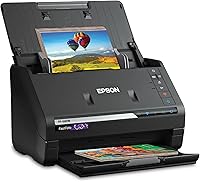
Epson FastFoto FF-680W: Best overall
- Up to 36 prints per batch
- Duplex single-pass scanning
- 1200 dpi enlargement mode
- USB and Wi-Fi
The Epson FastFoto FF-680W is the scanner to buy when the job is a whole box of prints rather than a handful. It feeds up to 36 photos in a batch and Epson rates it at about one photo per second at 300 dpi.
Over a long session that pace is what keeps a family archive project moving instead of stalling on the third evening.
Duplex capture is the feature that sets it apart. A single pass grabs the image and any handwritten note on the back, so captions and dates stay with the picture.
Format options cover quick sharing at 300 dpi, archiving as 600 dpi TIFF and enlarging at an interpolated 1200 dpi. The interpolation matters: 600 dpi is the real optical figure, so treat the enlargement setting as a convenience rather than true detail.
It handles Polaroid photos, panoramas and postcards up to 8 x 10 in. Epson includes a carrier sheet and a microfiber cloth, and the FastFoto app adds voice notes and slideshows.
Dropbox and Google Drive upload runs as it scans. A document feeder and OCR also make it a usable office scanner for paperwork after the photos are done.
Buy it for bulk family photo projects. Its CIS sensor and 600 dpi optical rating leave the flatbeds here ahead for single large enlargements.
Epson Perfection V850 Pro: Best for large enlargements
The Epson Perfection V850 Pro is the flatbed for a print you plan to enlarge and frame. Its 6400 dpi optical resolution and 4.0 Dmax give it the widest tonal range in this group, so deep shadows and bright highlights keep their detail.
On a faded portrait that difference shows up as open shadow areas instead of flat black.
A dual lens system picks the better lens for the job: one for high-resolution scans and one for fast everyday passes. Digital ICE removes dust and scratches, which matters on prints stored loose in a drawer.
The glass also takes film holders for slides and negatives. It connects by USB only.
This is a big machine. It measures about 19.8 in wide and weighs 20.9 lb, so it needs a permanent desk spot rather than a shelf that gets cleared away.
At 23 watts it also draws more than a small CIS flatbed. The scan time per print is longer than any feeder here, so its strengths are quality and control, not volume.
Buy it when scan quality beats speed, such as restoring one wedding portrait or making a large print from a small original. For a thousand snapshots, a feeder is the better tool.
Canon CanoScan LiDE 400: Best for a small desk
The Canon CanoScan LiDE 400 is the flatbed for a small apartment desk. It measures 14.5 x 14.5 x 1.7 in and weighs 3.6 lb, so it slides behind a monitor or into a drawer between sessions.
That footprint is what separates it from the two Epson flatbeds.
Canon rates it at 8 seconds per scan with 4800 x 4800 dpi resolution, which is plenty for prints. Color restore and dust removal handle faded snapshots without extra software.
Five EZ buttons and an auto scan mode that detects what's on the glass keep the workflow simple, and the PDF buttons save searchable multi-page files when you're scanning documents.
One USB Type-C cable carries both data and power, so there's no power brick to find room for. It scans documents up to 8.5 x 11.7 in as well as photos.
The catch is one print at a time. Canon lists it as USB only with no wireless, and its CIS sensor gives up some shadow detail against the CCD flatbeds.
Buy it for quality scans in a small space. Skip it if you have hundreds of prints to process, since a flatbed's one-at-a-time pace adds up quickly.
ScanSnap iX2500 Photo Edition: Best for wireless batches
- Up to 100 photos per minute
- Wi-Fi 6 and USB-C
- Three photo carrier sheets
- Large touchscreen
The ScanSnap iX2500 Photo Edition is the wireless batch option. It holds up to 36 photos in its feeder and scans up to 100 photos per minute, with built-in Wi-Fi 6 so you can send files to a phone or cloud service without a computer in the room.
USB-C is there when you want a cable instead.
The Photo Edition adds three carrier sheets for delicate prints and quick-start instructions for photo profiles. A large touchscreen lets you pick a profile and destination without opening a laptop.
Automatic rotation, cropping, color restoration and red-eye reduction run as it scans, and the software names and sorts files so a large batch arrives organized.
The catch against the Epson FastFoto is resolution: 600 dpi optical on a CIS sensor. That's fine for sharing and archiving prints, but the flatbeds here beat it for enlargements.
It also scans documents, receipts and business cards in the same feeder. Its touchscreen and Wi-Fi setup make it the easier one to live with in a shared room.
Buy it for a phone-first workflow where photos go straight to cloud storage. It also handles receipts, business cards and documents in the same feeder.
Plustek ePhoto Z300: Best for fragile prints
- CCD sensor
- 2 seconds per 4x6 print
- Roller feed for delicate photos
- 600 dpi
The Plustek ePhoto Z300 is built for prints that a document feeder would damage. Its roller system is designed to be gentle on old photos with sticky or fragile surfaces, and Plustek says it handles photos and papers under 0.76mm thick, including Polaroid-style prints.
That thickness limit is the key spec to check before you feed instant prints.
The CCD sensor is the other selling point. Plustek says CCD delivers better color accuracy and dynamic range than CIS, which helps hold detail in the highlights and dark areas of faded photos.
A 4x6 print scans in about 2 seconds at 300 dpi, and an 8x10 takes about 5 seconds. It scans 3x5, 4x6, 5x7 and 8x10 prints as well as letter and A4 paper, and the automatic feed starts as soon as a photo is inserted.
It's simplex only, so it captures one side per pass, though the software can merge two images into one file. Photo enhancement, auto-crop and rotate are included, with one-click upload to Facebook, X and Google Drive.
The trade-off against the feeders is one photo at a time rather than a stack.
Buy it for one-at-a-time scanning of prints you don't want to risk in a feeder. It suits mixed sizes from 3x5 up to 8x10.
HP Small Photo and Document Scanner HPPS100: Best for scanning on the road
The HP Small Photo and Document Scanner HPPS100 is the travel scanner. It weighs 3 ounces and measures about 2 in deep, so it slips into a bag beside a laptop.
It's a simplex sheet-fed model, so it takes one side of a photo or document per pass.
HP rates it at 15 ppm, or about 4 seconds per page, and lists 300 dpi resolution. It handles paper from 2 x 2.9 in up to 8.5 x 14 in and saves to PDF, JPG and other formats.
Power comes over USB 2.0 with the included cable, so there's no battery or adapter to pack. The 10-sheet feed handles a small stack of receipts or cards in one go.
The HP WorkScan software adds auto-scan, size detection, cropping and background cleanup. It's built for light jobs on the go: a few photos, receipts and business cards, not a shoebox of family prints.
It's simplex only and takes fewer sheets per batch than the feeder models. For a dedicated photo project at home, the feeder models here are faster and higher rated.
Buy it for occasional scans while traveling. Skip it as your main photo scanner if you have a large collection waiting.
Epson Perfection V600 Photo Wired USB Connectivity: Best for mixed print and film
The Epson Perfection V600 Photo is the flatbed to get if prints and film share the same box. Its built-in transparency unit scans four mounted 35mm slides or 12 negatives at a time, plus medium format film up to 6 x 22cm.
The film holders come in the box with the scanner.
For prints, it offers 6400 x 9600 dpi and a maximum scan area of 8.5 x 11.7 in. Epson rates enlargements up to 17 x 22 in.
Digital ICE removes dust and scratches, and Epson's ReadyScan LED light means no warm-up wait before a scan. The four buttons handle scan, copy, email and PDF without opening the software first.
It's the lowest score here because the V850 Pro does the same print job with a wider tonal range, and the fast feeders beat it for bulk. Its edge is 6400 dpi and film support in one machine at a lower tier.
It connects by USB and weighs about 9 lb.
Buy it when film is part of the plan too. For prints alone, the V850 Pro or a sheet-fed model is the stronger choice.
If you're weighing sensor types first, our explainer on what is a CCD scanner covers why flatbeds like this one use that design.
How these high resolution photo scanners compare
The comparison below puts the key specs side by side: sensor type, resolution and how each model feeds prints. Use it to narrow the list before reading the buying advice.
| Product | Best for | Sensor | Optical resolution | Batch capacity | Our score |
|---|---|---|---|---|---|
| Epson FastFoto FF-680W | overall | CIS | 600 dpi | 36 photos | 9.2 |
| Epson Perfection V850 Pro | large enlargements | CCD | 6400 dpi | 9.0 | |
| Canon CanoScan LiDE 400 | a small desk | CIS | 4800 dpi | 8.7 | |
| ScanSnap iX2500 Photo Edition | wireless batches | CIS | 600 dpi | 36 photos | 8.5 |
| Plustek ePhoto Z300 | fragile prints | CCD | 600 dpi | 8.3 | |
| HP Small Photo and Document Scanner HPPS100 | scanning on the road | CIS | 300 dpi | 7.1 | |
| Epson Perfection V600 Photo Wired USB Connectivity | mixed print and film | CCD | 6400 dpi | 7.0 |
Our score weighs specs, features and the fit with what a print collector needs most. Resolution counts, but so do batch size, sensor type and how gently a scanner treats an old print.
We started with scanners sold as photo models and checked the published optical resolution rather than interpolated numbers. Interpolated resolution is software-doubled and tells you less about real detail.
That's why the Epson FastFoto's 600 dpi is the figure we rank it on, not its 1200 dpi enlargement setting.
Then we grouped them by feeding method. Sheet-fed models handle stacks quickly; flatbeds lay each print on glass and suit thick, curled or mounted prints.
Sensor type came next, since CCD and CIS behave differently on faded color. CCD models like the V850 Pro and Plustek Z300 get credit for tonal range; CIS models get credit for slim bodies and speed.
Finally we looked at the extras that change daily use: duplex capture for writing on the back, carrier sheets for delicate prints, film units and connection options. A scanner only scores high here if its strengths match a real print job.
A travel scanner with a great software bundle still loses points if it can't handle a collection.
Which resolution do you actually need for prints?
For most printed photos, 600 dpi is the practical sweet spot. A 300 dpi scan is fine for sharing and on-screen viewing, while 600 dpi keeps enough detail to reprint at the same size or make a modest enlargement.
When 300 dpi is enough
Use 300 dpi when the goal is digital copies for family, a slideshow or a cloud backup. Files stay small and scans finish quickly.
The Epson FastFoto's sharing mode uses this setting.
When to scan at 600 dpi or higher
Step up to 600 dpi for archiving and 1200 dpi or more when a small print will become a large enlargement. The flatbeds here reach 4800 to 6400 dpi optical, which matters when you crop hard or print big.
The trade-off is time and file size: a 1200 dpi scan of a 4x6 print is many times larger than the 300 dpi version. A large album at high resolution will also need serious storage.
What to ignore in the spec sheet
Ignore interpolated resolution as a quality signal. A 1200 dpi software-doubled scan of a 600 dpi optical scanner does not contain more real detail than the 600 dpi file.
The same goes for a high dpi figure printed next to a small scan area; check the optical number and the sensor type together.
Should you choose a flatbed or a sheet-fed photo scanner?
Choose a sheet-fed scanner for volume and a flatbed for control. A feeder moves 36 prints or more in one batch, while a flatbed takes one print at a time but handles anything that won't feed.
Sheet-fed scanners for large collections
Feeder models like the Epson FastFoto FF-680W and ScanSnap iX2500 Photo Edition suit shoeboxes and albums. They scan both sides in one pass on duplex models and add enhancement automatically.
Delicate prints ride in carrier sheets. At about one photo per second, the FastFoto can clear a 500-print box in under half an hour of scan time.
Flatbeds for thick or mounted prints
A flatbed such as the Epson Perfection V850 Pro or Canon LiDE 400 lays the print on glass, so curled, thick or album-mounted photos sit flat without a feed mechanism pulling at them. This is also the format to choose for a single enlargement that needs maximum detail.
If cards are your main collection, our roundup of the best photo scanner for trading cards covers scanners built for rigid, glossy stock.
What should you check before buying a photo scanner?
Check the optical resolution first, then the sensor type and how the scanner feeds prints. Those three decide scan quality and how long a full album will take.
Optical versus interpolated resolution
Only the optical figure describes real detail captured from the print. Interpolated figures are doubled in software and can mislead.
The Epson FastFoto lists 600 dpi optical with a 1200 dpi enlargement mode; the V850 Pro's 6400 dpi is optical. When two scanners quote similar optical figures, the next tiebreaker is sensor type and dynamic range, not a bigger interpolated number.
CCD versus CIS sensors
CCD sensors generally handle color depth and shadow detail better, which helps on faded prints. The V850 Pro, V600 and Plustek Z300 all use CCD.
CIS sensors are lighter and allow slim bodies and fast feeders, as on the FastFoto, ScanSnap and Canon LiDE. Our guide to the CCD design explains the difference in more depth.
Carrier sheets and delicate prints
Old prints can stick, curl or tear. A carrier sheet holds the photo flat and keeps it off the rollers.
The Epson FastFoto includes one and the ScanSnap Photo Edition includes three. Without one, scan fragile prints on a flatbed instead.
The Plustek Z300 takes a different route with a gentle roller feed and a thickness limit of 0.76mm.
Connections and file workflow
USB is the simplest connection and needs no network. Wi-Fi models like the Epson FastFoto and ScanSnap let you send scans to a phone or cloud drive without a computer.
Check the software bundle too: OCR, color restoration and auto-crop save hours on a large collection. For a broader look at matching a scanner to your photos, see our guide to scanners for old photos and documents.
Which photo scanner gives the best high resolution scans?
The Epson Perfection V850 Pro gives the highest-resolution scans in this group, at 6400 dpi optical with a 4.0 Dmax. It's the one to choose when one print needs to become a large enlargement.
The Canon LiDE 400 reaches 4800 dpi in a much smaller body, and the Epson Perfection V600 matches 6400 dpi while adding film support. For stacks of ordinary prints, the 600 dpi feeders trade peak resolution for speed and still produce sharp digital copies.
Verdict: which high resolution photo scanner should you buy?
For most people scanning prints, the Epson FastFoto FF-680W is the best high resolution photo scanner to buy, because it turns a box of photos into digital files in batches and keeps handwritten notes with each shot. Pick the Epson Perfection V850 Pro for a large enlargement or the Canon CanoScan LiDE 400 for a small desk.
Choose the ScanSnap iX2500 Photo Edition for wireless batches, the Plustek ePhoto Z300 for fragile prints and the Epson Perfection V600 Photo when film is part of the job. The HP HPPS100 is the travel pick for occasional scans away from home.
Our top 3 picks at a glance
-
1
-
2
-
3
Frequently asked questions
What resolution do I need to scan printed photos?
Scan a standard 4x6 print at 300 dpi for sharing and at 600 dpi when you might want a larger copy later. Go to 1200 dpi or higher only for small prints you plan to blow up, because file sizes climb fast.
Is a CIS or CCD scanner better for photos?
A CCD sensor usually captures better color depth and shadow detail on prints and film. CIS sensors are lighter and thinner, which suits flatbeds like the Canon LiDE 400 and fast sheet-fed models like the Epson FastFoto.
Can a photo scanner handle old or fragile prints?
Yes, if it includes carrier sheets or a gentle feed. The Epson FastFoto FF-680W ships with a carrier sheet and the ScanSnap iX2500 Photo Edition includes three, so delicate prints travel through the feeder without direct contact.
Do I need a flatbed or a sheet-fed scanner for prints?
A sheet-fed scanner moves stacks of prints quickly and suits large collections. A flatbed lays each print flat on glass and handles prints that are curled, mounted or too thick to feed.
Can I scan Polaroid photos and postcards?
The Epson FastFoto FF-680W handles Polaroid photos, panoramas and postcards up to 8 x 10 in. For very thick instant prints, a flatbed gives you more control over placement.