Epson Perfection V850 Pro Review: Worth It? (November 2026)
The Epson Perfection V850 Pro is the flatbed to buy for archiving photos and film at high quality, with 6400 dpi, a 4.0 Dmax and a dual lens system. Skip it if you only scan snapshots and want speed, where an auto-feed model makes more sense.
On this page (9 sections)
- The Epson Perfection V850 Pro at a glance
- Who should buy the Epson Perfection V850 Pro
- The specs that matter in daily use
- Setting up the Epson Perfection V850 Pro
- Scanning prints and film with the V850 Pro
- How to keep the V850 Pro scanning well
- The trade-offs to weigh before buying
- Alternatives worth a look
- Verdict: is the Epson Perfection V850 Pro worth it?
The Epson Perfection V850 Pro is the flatbed to buy for archiving photos and film at high quality, with 6400 dpi, a 4.0 Dmax and a dual lens system. Skip it if you only scan snapshots and want speed, where an auto-feed model makes more sense.
This Epson Perfection V850 Pro review covers what the specs mean in daily use and who should pick something else.
It's a large, deliberate machine built for quality rather than volume. If your goal is to get the most detail out of a shoebox of negatives and family prints, it earns its spot.
If your goal is to clear a whole photo box this weekend, a feeder will serve you better.
The Epson Perfection V850 Pro at a glance
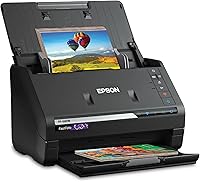
The V850 Pro is a high-resolution photo and film flatbed with a CCD sensor and a dual lens system. Epson positions it for professional-quality scans of slides, film and photos, and the included film holders back that up.
Epson Perfection V850 Pro: Best for film and photo archiving

- 6400 dpi resolution
- 4.0 Dmax
- Dual lens system
- Digital ICE
- CCD sensor
- Film holders included
A high-resolution flatbed for scanning photos, slides and film with strong shadow detail. It's a large, deliberate machine, not a quick snapshot feeder.
Pros
- 6400 dpi and a 4.0 Dmax for detail and shadow depth
- Dual lens system picks the best lens for the job
- Digital ICE helps clean up dust and scratches on film
- Film holders included for slides and negatives
Cons
- Heavy at 20.9 lb and wide at 19.8 in
- USB connection only, no wireless
- Needs a dedicated spot on a desk
It's best suited to someone with a defined archive project and a spot to leave the scanner set up. Pulling it in and out of a closet between sessions gets old fast at this size.
The number to hold onto from the spec sheet is 20.9 pounds. That's the weight of a small monitor, not a slim accessory you slip into a drawer.
Its footprint is 12.1 inches deep, 19.8 inches wide and 6 inches high, so it takes up real desk space even before you open the lid.
What the score means
Our score weighs specs, features and buyer feedback against what you're shopping for. The 9 reflects its resolution, tonal range and film support against the flatbed competition, with points held back for its weight, its USB-only connection and its one-photo-at-a-time pace.
A cheaper photo flatbed will do for casual prints; this one is aimed at quality.
Who should buy the Epson Perfection V850 Pro
Buy it if you have film, slides or prints you want to keep at high quality, and you're willing to scan at a measured pace. The combination of 6400 dpi, a 4.0 Dmax and Digital ICE is built for exactly that job.
It's also a good fit for someone digitizing a family archive of negatives and slides for the long term. The film holders and Digital ICE save you from fighting dust and scratches frame by frame.
Skip it if you have a large box of ordinary prints and no film. A flatbed forces you to lift the lid, place each photo and close it again, which adds up over hundreds of snapshots.
The Epson FastFoto FF-680W review covers the faster route for that job.
Skip it too if desk space is tight. At 19.8 inches wide and 20.9 pounds, it needs a permanent home.
A shared desk where the scanner has to be packed away after each session is the wrong setting for this model.
The specs that matter in daily use
The headline numbers are 6400 dpi and a 4.0 Dmax, and they translate into detail and shadow depth. High resolution helps when you scan small film frames you plan to enlarge.
The 4.0 Dmax matters for dense negatives and slides where shadow areas can go muddy on a lesser scanner.
Epson's dual lens system selects from two lenses for the best result. Practically, it means the scanner can pick the right lens for the type of original, so you're not stuck with one compromise setting for both prints and film.
The CCD sensor is the other spec worth knowing. It's the sensor type Epson pairs with this level of resolution and tonal range, and it's the part that carries the quality story.
The light source is an LED array, which is the steady, long-life light behind the scan.
Resolution figures can confuse people: the spec sheet lists 9600, while Epson's headline for this model is 6400 dpi. Treat the higher figure as the interpolated maximum and the 6400 dpi as the optical resolution to plan around.
The power draw is modest at 23 watts, so it won't tax a shared desk outlet.
What the film holders do
The film holders in the box are the piece that turns this from a photo flatbed into a film scanner. They hold slides and negatives flat and evenly spaced, so frames sit square on the glass instead of drifting.
That matters more than it sounds. A loose negative curls and shifts, and the scan comes out soft or crooked.
A holder keeps each frame in the same position, so a roll scans with consistent framing and you spend less time fixing crop and alignment afterward.
Setting up the Epson Perfection V850 Pro
Set the scanner on a firm, level desk with room for the lid and film holders, then connect it by USB. It's a wired machine, so plan for a cable run to your computer rather than a wireless setup.
Clear the area around the scanner before you start. The lid needs room to open fully, and you'll want space to lay out film holders and negatives without stacking them.
Check your computer against Epson's list before buying. The V850 Pro names Windows 8.1, Windows 8, Windows 7, Windows Vista and Windows XP professional x64 Edition, plus Mac OS X 10.6 through 10.10.
Newer operating systems aren't on that list, so plan accordingly. The minimum system requirement Epson lists is Windows XP, which tells you how far back the supported range goes.
Install the software, then do a first scan on a single print to confirm the connection and the basic settings. Move on to film once prints look right.
Scanning prints and film with the V850 Pro
The V850 Pro handles flat prints and film, and the film holders included in the box are what make it a film scanner as well as a photo flatbed. For prints, lay the photo face down on the glass and close the lid.
For slides and negatives, load them into the film holders rather than laying them loose on the glass. The holders keep frames flat and evenly positioned, which matters for sharp results.
Digital ICE is the feature to use on film. It helps reduce the appearance of dust and scratches during the scan, saving you from retouching every frame afterward.
It's one of the main reasons to choose this model for a negative archive.
Work in a clean space and handle film by the edges. A quick blast of air before scanning cuts down on touch-ups later.
When you're done with a batch, pull the film out of the holders right away so dust doesn't settle in the slots.
How to keep the V850 Pro scanning well
Keep the glass clean and the scanner covered when it isn't in use. Dust on the glass shows up in every scan, and it's the simplest thing to control.
Wipe the glass with a soft, lint-free cloth and a cleaner meant for optics. Avoid spraying liquid directly onto the glass; dampen the cloth instead.
Keep the lid closed when the scanner is idle. A cover or a clean cloth over the top keeps dust off the platen and the film holders between sessions.
Store film holders in a clean bag or box so dust doesn't settle in the frame slots. Handle the glass with care and avoid pressing hard on the lid when film is loaded.
A gentle press is all the lid needs to sit flat; force it and you risk stressing the glass or the hinge.
Keep the scanner away from direct sun and heat. A stable spot on a desk is better than a shelf near a radiator.
The LED light source doesn't need warm-up time, so short sessions are fine; just don't leave the scanner running and idle for hours when it could be off.
The trade-offs to weigh before buying
The main trade-off is speed and convenience. The V850 Pro is a flatbed, so you load one original or a small batch at a time.
A large box of prints will take far longer than it would on an auto-feed scanner. Epson lists a standard sheet capacity of 10 for this model, though as a flatbed it still scans one original or holder at a time rather than feeding stacks.
Its size and weight are the second consideration. At 20.9 pounds and 19.8 inches wide, it's not something you tuck away after each use.
It wants a permanent desk spot. Measure your desk before it arrives, and think about where the lid swings open.
The USB-only connection is the third. There's no wireless option, so the scanner stays tethered to your computer.
That's fine for a fixed setup, less so if you want to scan from another room. The connection type is listed simply as USB, so plan a cable run and a nearby port.
Finally, check the operating system list. Newer Windows and Mac versions aren't named, so confirm compatibility with your machine before you commit.
This is the one spec that can stop a purchase cold, and it's worth checking first.
Alternatives worth a look
If the V850 Pro isn't quite right for your project, these three cover the common alternatives: fast feeder scanning, simple home photo scanning and a smaller flatbed.
Epson FastFoto FF-680W for big photo boxes
The FastFoto FF-680W is the pick when speed matters more than film support. It feeds stacks of prints rather than scanning one at a time, so a full photo box moves much faster.
Choose it for a shoebox of snapshots and skip it if you need high-resolution film scans. Our rundown of the best auto feed photo scanner compares the leading feeders.
The split is simple: the feeder wins on volume, the V850 Pro wins on film and detail.
Best home scanner for photos
For a smaller, simpler flatbed, start with the best home scanner for photos shortlist. Those models suit occasional print scanning without the V850 Pro's size or film setup.
You give up 6400 dpi and the dual lens system, and you gain a scanner that fits on a shelf.
Epson Perfection V19 II for a compact flatbed
The Epson Perfection V19 II review covers a much smaller Epson flatbed. It takes up little desk space and handles everyday photo scans, without the V850 Pro's film holders or 6400 dpi resolution.
The V19 II is the one to consider when you scan the odd photo and want the scanner out of the way the rest of the time. The V850 Pro is the opposite: a fixed workstation for a serious archive.
Verdict: is the Epson Perfection V850 Pro worth it?
Yes, if your project is archiving film and photos at high quality and you have the desk space. The 6400 dpi, 4.0 Dmax and dual lens system put it at the top of the flatbed field for detail and shadow depth.
Digital ICE and the included film holders make it a complete film-scanning setup.
The reasons to skip are clear: it's large and heavy, it's USB-only, and it scans one original at a time. If you mostly have prints, a feeder saves you hours.
If you want a compact flatbed for occasional photos, the smaller Epson makes more sense.
Check the operating system list before you order. That's the quiet spec that decides whether the scanner will even run on your machine, and it's easy to overlook while you're focused on dpi and film holders.
Pick the V850 Pro when film and long-term quality are the goal. Pick a feeder for volume, or a compact flatbed for casual prints.
That's the short version of this Epson Perfection V850 Pro review: it's the quality pick, not the fast one.
Frequently asked questions
Does the Epson Perfection V850 Pro scan slides and negatives?
Yes. Film holders come in the box for slides and film, and Digital ICE helps reduce dust and scratches on film scans.
That film support is the main reason to choose this model over a plain photo flatbed.
Is the Epson Perfection V850 Pro good for scanning large photo boxes?
No. It's a flatbed, so you load one photo or a small batch at a time.
For a large box of prints, an auto feed photo scanner scans stacks far faster.
What computer does the Epson Perfection V850 Pro work with?
Epson lists Windows 8.1, Windows 8, Windows 7, Windows Vista and Windows XP, plus Mac OS X 10.6 through 10.10. Check your operating system against that list before you buy, since newer versions aren't named.
How much space does the Epson Perfection V850 Pro need?
The scanner measures 12.1 inches deep, 19.8 inches wide and 6 inches high, and weighs 20.9 lb. Plan a clear, stable desk area with room to open the lid and load film holders.